
A website can look professional and still have weak copy. The design may be clean, the images may look good and the buttons may work, but if a visitor cannot understand what the business does, who it helps, why they should trust it or what they should do next, the website is still leaving important work unfinished. A Website Copywriting Checklist gives us a simple way to review these things before publishing a new website or making changes to an existing one.
This checklist is mainly useful for small business and service business websites, where the main goal is usually to help a visitor understand the offer and then call, enquire, book, request a quote or take another useful step. It is not meant to turn every website into a huge page full of text. In fact, a good website content checklist should help us remove unnecessary words while making the important information easier to find. Recent small-business website guidance also places strong focus on clear offers, customer questions, proof, contact details and obvious next steps.
The 30 points below are divided into practical areas so that you can review the website section by section instead of trying to judge the whole site at once.
How to Use This Website Copywriting Checklist
Before checking individual sections, open the website as if you have never seen it before. Do not read it as the business owner who already knows what every service means. Read it like someone who has just found the business through Google and is deciding whether the company can actually help.
For each point, mark it as Pass, Needs Work or Missing. A point does not need to be perfect to pass, but the information should be clear enough for a normal visitor to understand without having to guess.
A useful review can also be done on a phone because many local and service-business visitors will first see the website on a mobile device. The goal is not to find 30 reasons to rewrite the entire website. The goal is to find the few places where unclear copy may be making the visitor work too hard.
Part 1: Check the Main Message
1. Is It Clear What the Business Does?
The first point in our Website Copywriting Checklist is also one of the most important. A new visitor should be able to understand the main service without reading the whole homepage or trying to understand a clever business slogan.
For example, “Helping You Build Better Futures” does not tell a visitor much if the company is actually an accounting firm. A clearer headline such as “Tax and Accounting Services for Small Businesses in Delhi” gives the visitor useful information immediately.
Check: Can someone who has never heard of the business explain what it does after reading the first section?
2. Does the Homepage Say Who the Service Is For?
A website becomes more useful when the visitor can quickly see that the business works with people like them.
A general statement such as “Professional website design services” is not wrong, but “Website Design for Local Service Businesses” gives a much clearer idea of the target customer. The copy does not need to exclude every other type of customer, but it should make the main audience easy to recognise.
Check: Does the copy make the right customer feel that the website is relevant to them?
Our earlier article, How to Write a Headline for a Local Service Website explains how a local service business can make its headline clearer.
3. Is the Main Benefit Easy to Understand?
A business may explain what it does without explaining why the customer should care. Good website copy connects the service with a useful result or problem.
For example, “We provide weekly home cleaning” explains the service, while “Keep your home clean without giving up your weekend” connects the service with a reason someone may want it.
The benefit should be honest and realistic rather than exaggerated. We do not need claims such as “the best service in the city” when the copy can simply explain what the customer gets.
Check: Does the visitor understand how the service can help them?
4. Is the Main Headline Specific?
Generic headlines are one of the easiest things to find during a website review. Phrases such as “Quality You Can Trust,” “Your Success Is Our Mission” or “Solutions That Work” may sound positive, but they could appear on thousands of different websites.
A stronger headline normally gives the visitor useful information about the service, customer, location or result. It should sound natural and fit the business rather than trying to sound clever.
Check: Could a competitor copy the headline and use it without changing anything?
If yes, the headline probably needs more detail.
5. Is There One Clear Main CTA?
The homepage should guide the visitor toward a sensible next step instead of giving every possible action equal importance. Depending on the business, that could be Request a Quote, Call Us, Book an Appointment, Schedule a Consultation or Check Availability.
There can be secondary links, but the main action should be easy to identify. Recent homepage guidance also recommends using a clear primary CTA rather than making visitors choose between too many competing actions.
Check: Can you identify the main action within a few seconds?
Part 2: Check the Homepage Copy
6. Does the Homepage Explain the Main Services?
A homepage does not need to explain every service in full, but visitors should be able to see the main services and move to the right page for more information.
For example, a plumber might have short sections for emergency plumbing, drain cleaning, water heater repair and bathroom plumbing, with links to the relevant service pages. This gives visitors a simple overview without turning the homepage into a full service catalogue.
Check: Can a visitor quickly find the service they came looking for?
7. Does the Copy Talk About Customer Problems?
Good Website Copywriting Checklist reviews should look beyond features and service names. A customer usually arrives because they have a question, problem, goal or need, so the copy should show that the business understands the situation.
A plumber can mention a blocked drain, a business coach can mention difficulty getting consistent leads and an electrician can discuss problems that need attention quickly. This does not mean filling the page with negative language. It simply makes the copy more connected to the reason people are searching.
Check: Does the website show that the business understands why customers need the service?
8. Are Benefits Explained Alongside Features?
Features tell people what is included, while benefits explain why that feature may matter.
For example, “Online appointment booking” is a feature. “Book your appointment without waiting for a call back” explains the practical benefit.
We do not need to turn every sentence into a sales pitch. A few clear connections between features and customer benefits can make service descriptions much easier to understand.
Check: Are important features connected to a useful customer benefit?
9. Is the Copy Easy to Scan?
Visitors do not always read a website from the first word to the last. They often scan headings, subheadings, short paragraphs, buttons and highlighted information before deciding which sections deserve more attention.
This is why a good Website Content Checklist should include structure as well as writing quality. Long blocks of text can hide useful information even when the writing itself is good.
Check: Can someone scan the page and understand its main points without reading every paragraph?
10. Does Every Homepage Section Have a Reason?
More sections do not automatically make a homepage better. A business may add an About section, services, benefits, testimonials, process, FAQs, gallery, blog posts, awards and several other blocks, but if the sections repeat the same message, the page becomes longer without becoming more useful.
Each section should answer a question, build trust, explain the service or guide the visitor toward the next step.
Check: If you remove a section, would the visitor lose useful information?
If not, consider removing it.
Part 3: Check the Service Pages
11. Is Each Service Clearly Named?
The service page should make its subject obvious from the page title and main heading. Avoid using creative names that force visitors to guess what the service actually is.
For example, “Complete Home Comfort” may be a package name, but “Air Conditioner Repair and Service” immediately tells the visitor what the page covers.
Clear service names also make internal navigation easier because visitors can recognise where each link will take them.
Check: Does the service name match the words customers are likely to understand and search for?
12. Does Each Service Page Explain Who It Is For?
A service page should help visitors decide whether the service matches their situation.
For example, a website design page for small businesses might explain that it is suitable for businesses that need a simple website, clear service pages and an easier way for local customers to enquire.
This does not have to be a long section. A short paragraph can often be enough.
Check: Can the right visitor quickly recognise that this service is suitable for them?
13. Does the Page Explain What Is Included?
One of the most useful checks in a Website Copywriting Checklist is whether the customer can understand what they are actually paying for or enquiring about.
Instead of saying “Complete website copywriting,” explain what that includes, such as homepage copy, service pages, About page, calls to action and basic page messaging, if those are genuinely part of the service.
Clear scope helps reduce confusion and makes the service easier to compare with alternatives.
Check: Would a customer understand what they will receive?
14. Does the Service Page Explain the Process?
Customers often want to know what happens after they enquire, especially when the service involves several steps or takes weeks to complete.
A simple process such as Enquiry → Consultation → Proposal → Work Begins → Final Delivery can remove some uncertainty.
The process should be accurate to the actual business. Do not add steps simply because they look good on a website.
Check: Does the visitor know what happens after they decide to move forward?
15. Does the Page Have Proof?
A service page can make strong claims, but proof gives visitors something more useful to judge.
Depending on the business, proof could include customer reviews, project examples, before-and-after examples, case studies, qualifications, certifications or real photographs. The important point is that the proof should support the claim being made.
For example, if a page says the business has experience with large commercial projects, showing relevant projects is more useful than simply repeating the word “experienced.”
Check: Does the page provide evidence that supports important claims?
Part 4: Check Trust and Business Information
16. Is the About Page Useful?
An About page should tell visitors enough about the people behind the business to help them understand who they may be hiring or working with.
It does not need to become a long company history. A useful About page can explain how the business started, who runs it, relevant experience and what approach the business takes when working with customers.
Our earlier article, Before and after: a coaching centre’s About page rewritten explain a practical example of turning generic About copy into more useful customer-focused content.
17. Are Reviews Specific?
Reviews are more useful when they explain something about the customer’s experience instead of only saying “Great service.”
A review that mentions good communication, quick response, careful work or a smooth planning process gives future customers more information about what they can expect.
The same principle applies to testimonials written for the website. If the business has permission to use customer comments, choose reviews that provide real detail.
Check: Do the testimonials say anything useful beyond praise?
18. Are Trust Claims Supported?
Be careful with statements such as “trusted by thousands,” “number one,” “best in the city” or “leading provider.” These claims may sound strong, but they can weaken the copy if there is no clear evidence behind them.
A better approach is to use specific facts where they are true, such as years in business, number of completed projects, relevant certifications or the actual areas served.
Google’s guidance also stresses creating helpful, reliable, people-first content rather than writing primarily to manipulate search rankings.
Check: Can the website support its important claims?
19. Are Business Details Consistent?
The business name, phone number, address, service area, opening hours and other important details should be correct wherever they appear.
This is particularly important for local businesses because customers may compare the website with the Google Business Profile or other business listings.
A Small Business Website Checklist should therefore include a basic accuracy check, especially after a change in phone number, location, opening hours or services. Current small-business guidance also recommends keeping contact details and business hours accurate and easy to find.
Check: Are the important business details current and consistent?
20. Does the Website Explain Where the Business Works?
For a local business, visitors often want to know whether the company serves their city, town or area.
The copy should name genuine service areas naturally rather than inserting a long list of locations into every page. If the business has useful location-specific pages, visitors should be able to reach them easily.
Our earlier article, How Many City Pages Do You Actually Need? explain how businesses should decide which location pages are actually useful.
Check: Can a visitor quickly tell whether the business serves their area?
Part 5: Check Pricing and Enquiry Copy
21. Is Pricing Information Clear Enough?
Not every business can publish one fixed price, but that does not mean the website has to provide no pricing information at all.
Where useful, a business can provide starting prices, typical ranges, package information or an explanation of what affects the final cost. This gives visitors some context before they enquire.
Check: Does the visitor have enough pricing information to understand whether the service may fit their budget?
22. Is the Enquiry CTA Specific?
“Submit” is technically a button label, but it tells the visitor very little about what happens next.
A more useful button might say Request a Quote, Book a Consultation, Check Availability or Ask About Your Project, depending on the business.
The best CTA is not always the most persuasive one. It is the one that clearly describes the next step.
Check: Does the button tell the visitor what will happen after they click?
23. Does the Contact Page Reduce Questions?
The contact page should make it easy for someone to get in touch without making them search for basic information.
Include the relevant contact method, expected response information if useful, opening hours where applicable and a short explanation of what happens after someone submits the form.
If a business normally replies within one working day, saying so can be useful. If there is no fixed response time, do not invent one.
Check: Would a first-time visitor know how and when to contact the business?
24. Does the Form Ask Only What Is Needed?
A contact form should collect information that helps the business understand and respond to the enquiry, but it should not become unnecessarily long.
For example, a local service business may need a name, phone number, email, service needed, location and short description. Asking for twenty fields before the business even speaks to the customer can create unnecessary work.
Check: Can the visitor complete the form without feeling like they are filling out an application?
Part 6: Check SEO Without Making the Copy Unnatural
25. Is the Main Keyword Used Naturally?
SEO should support the content rather than control every sentence.
The primary keyword can normally appear in the page title, main heading, introduction and relevant sections, but there is no useful reason to repeat it in every paragraph. Google’s people-first guidance recommends creating content primarily to help users rather than producing content mainly to attract search-engine visits.
Check: Does the keyword fit naturally into the page?
26. Do the Headings Describe the Content?
Headings should help both readers and search engines understand what each section covers.
For example, “How Our Emergency Plumbing Service Works” is more useful than “Our Process” because the first heading tells the reader what process is being discussed.
Do not turn every heading into a keyword. The heading should first make sense to the person reading it.
Check: Can someone understand the page structure just by reading the headings?
27. Are Internal Links Useful?
Internal links should help visitors move from one useful page to another.
For example, a homepage might link to a service page, a service page might link to a related service, and a location page might link to the main service page. The anchor text should give the visitor an idea of what they will find after clicking.
Our earlier article, The Hub and Spoke Method for Service Area Pages explains how service-area pages and related service pages can be connected into a clearer website structure.
Check: Does every internal link help the visitor find something relevant?
28. Are Location Keywords Used Naturally?
Local businesses often need to mention their city or service area, but adding the same city name again and again can make the copy uncomfortable to read.
For example, instead of writing “Best plumber in Delhi for plumbing services in Delhi serving Delhi customers,” write naturally about the service and mention the location where it actually helps the visitor.
Check: Does the location information sound like normal language?
Part 7: The Final Copy Review
29. Does the Website Sound Like a Real Business?
Read the website out loud before publishing it. This simple test can reveal sentences that look acceptable on screen but sound unnatural when spoken.
Look for phrases that feel too formal, repeated marketing language, unnecessary adjectives and sentences that a real business owner would never say to a customer.
The aim is not to make every website casual. The tone should match the business, but the words should still feel clear and human.
Check: Would the business owner actually say this to a customer?
30. Can a Visitor Understand the Website and Take Action?
The final point in this Website Copywriting Checklist brings everything together.
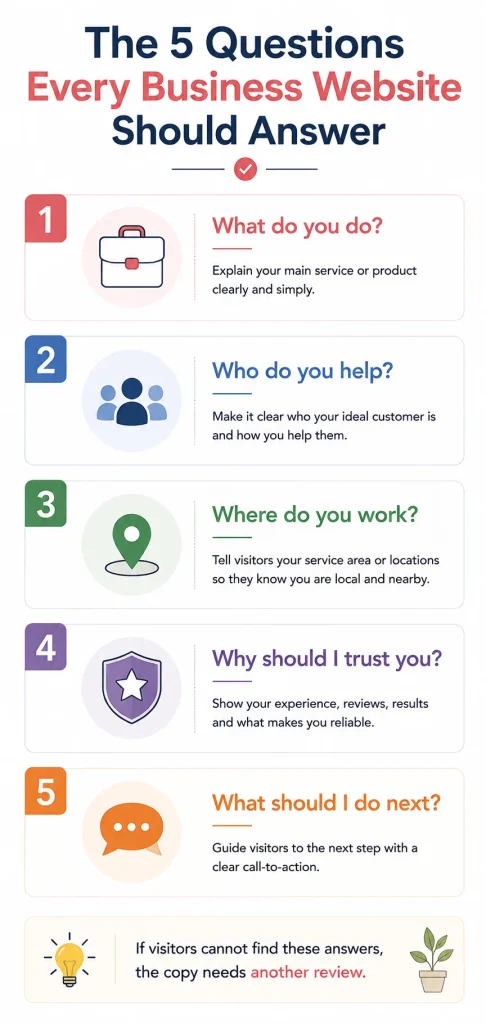
Open the homepage and imagine that you are a potential customer who has never heard of the business. Within a short visit, you should be able to answer five basic questions:
- What does this business do?
- Who is it for?
- Where does it work?
- Why should I trust it?
- What should I do next?
If the answers are easy to find, the website is doing its basic job. If the visitor has to search through several pages to answer them, the copy probably needs more work.
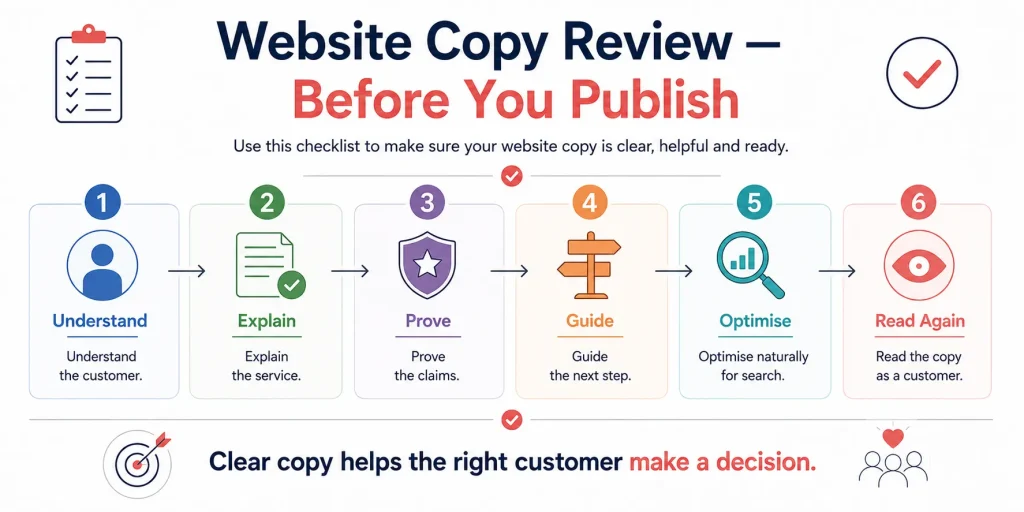
A Simple 30-Point Website Copy Checklist
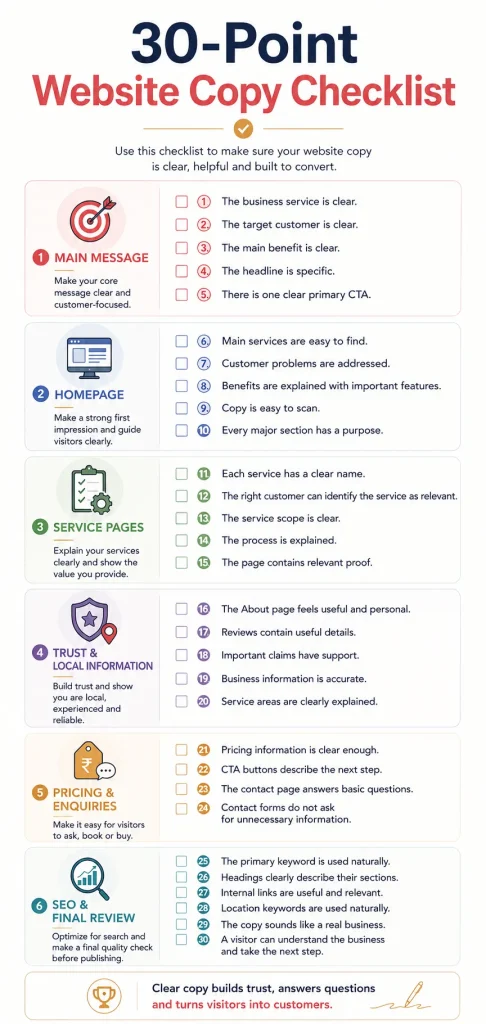
After going through the detailed sections, here is the shorter version that you can save and use when reviewing a website.
Main Message
☐ 1. The business service is clear.
☐ 2. The target customer is clear.
☐ 3. The main benefit is clear.
☐ 4. The headline is specific.
☐ 5. There is one clear primary CTA.
Homepage
☐ 6. Main services are easy to find.
☐ 7. Customer problems are addressed.
☐ 8. Benefits are explained with important features.
☐ 9. Copy is easy to scan.
☐ 10. Every major section has a purpose.
Service Pages
☐ 11. Each service has a clear name.
☐ 12. The right customer can identify the service as relevant.
☐ 13. The service scope is clear.
☐ 14. The process is explained.
☐ 15. The page contains relevant proof.
Trust and Local Information
☐ 16. The About page feels useful and personal.
☐ 17. Reviews contain useful details.
☐ 18. Important claims have support.
☐ 19. Business information is accurate.
☐ 20. Service areas are clearly explained.
Pricing and Enquiries
☐ 21. Pricing information is clear enough.
☐ 22. CTA buttons describe the next step.
☐ 23. The contact page answers basic questions.
☐ 24. Contact forms do not ask for unnecessary information.
SEO and Final Review
☐ 25. The primary keyword is used naturally.
☐ 26. Headings clearly describe their sections.
☐ 27. Internal links are useful and relevant.
☐ 28. Location keywords are used naturally.
☐ 29. The copy sounds like a real business.
☐ 30. A visitor can understand the business and take the next step.
How to Prioritise the Problems You Find
You do not have to fix all 30 points on the same day. If a website fails several checks, start with the information that can stop a visitor from understanding or using the website.
First, fix the main message, because unclear opening copy can make the rest of the website harder to understand. Next, fix the CTA and service information, because visitors need to know what the business offers and how they can move forward. After that, improve proof, pricing information, local details and internal links where they are relevant.
This approach is better than spending hours changing small wording choices while the homepage still has a vague headline or the service pages do not explain what customers actually receive.
Turn the Checklist Into a Regular Website Review
A website should not be treated as finished forever after it is published. Businesses change their services, prices, locations, opening hours and customer needs, so website copy can become outdated even when the design still looks good.
For that reason, this Website Content Checklist For Businesses can be used whenever an important business change happens and as a regular review tool. If a service has been removed, a new service has been added or the business has moved to another area, the relevant pages should be checked rather than assuming that old copy is still correct.
A simple review every few months can also help find small problems before they become larger ones. Recent small-business guidance similarly recommends revisiting website information when services, pricing, hours or contact details change, with a periodic review being a practical approach for many businesses.
Use the Checklist Page by Page
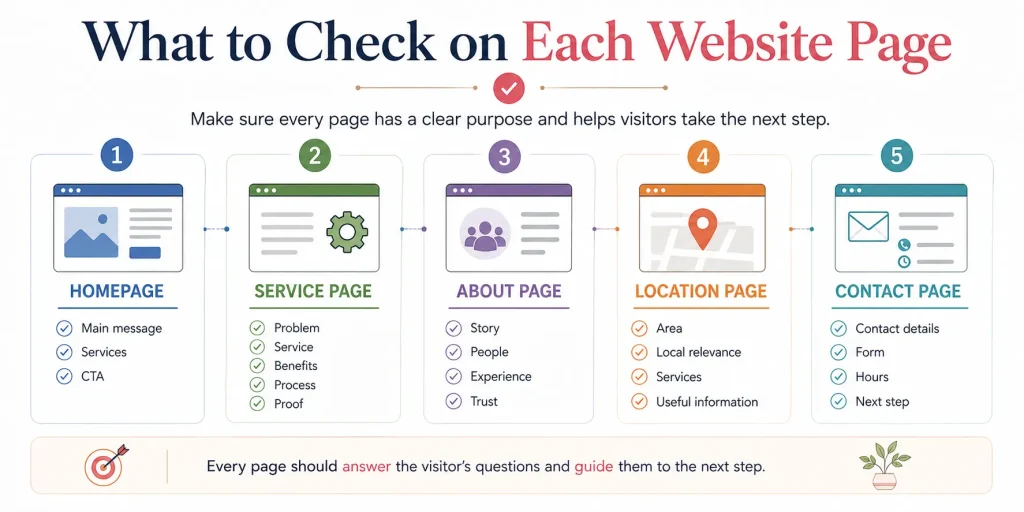
One mistake is to use the 30 points only on the homepage. Different pages have different jobs, so some checks will matter more on one page than another.
For example, a homepage needs a strong overview, clear service direction and a main CTA, while a service page needs more detail about the specific service, process, scope, benefits and proof. An About page needs more focus on the people and business story, while a contact page needs to make the next step simple.
That means the Website Copy Checklist should be treated as a flexible review rather than a rule that every page must contain all 30 elements.
What This Checklist Should Not Become
A checklist can be useful, but it can also become a reason to add too much content.
If you notice that a homepage is missing a section, do not automatically add one just because another website has it. The purpose of a Website Copywriting Checklist is to help us identify useful information, not to make every website look the same.
For example, a small local electrician may not need a large company history, a ten-step process or a long team page. If customers mainly need to know the service, service area, availability, proof and how to call, the website should focus on those things.
Good website copy is not about having the most words. It is about giving the right information at the right time.
Conclusion
A good website should not make visitors work hard to understand a business. They should be able to see what the business does, recognise whether the service is relevant to them, find enough information to build trust and understand what they can do next.
This Website Copywriting Checklist gives us a practical way to check those areas before publishing or updating a website. The 30 points cover the main message, homepage, service pages, trust, local information, pricing, enquiries, internal links and basic SEO, but they all come back to one simple goal: making the website easier for the right customer to understand.
If a website fails several points, do not try to rewrite everything at once. Start with the headline and opening message, then improve the service information and CTA, followed by proof, pricing, local details and supporting pages. A few clear improvements can often make a bigger difference than adding another thousand words to the homepage.
Most importantly, use the checklist from the customer’s point of view. The business owner already knows what the company does, what its services mean and why customers should choose it. The visitor does not have that background.
The best final test is therefore very simple: if someone finds the website for the first time today, can they understand the business, trust what they see and know what to do next? If the answer is yes, the website copy is doing its job.

One thought on “Website Copywriting Checklist: 30 Things to Check”