
A Fill-In-The-Blank Service Page Template Complete Guide
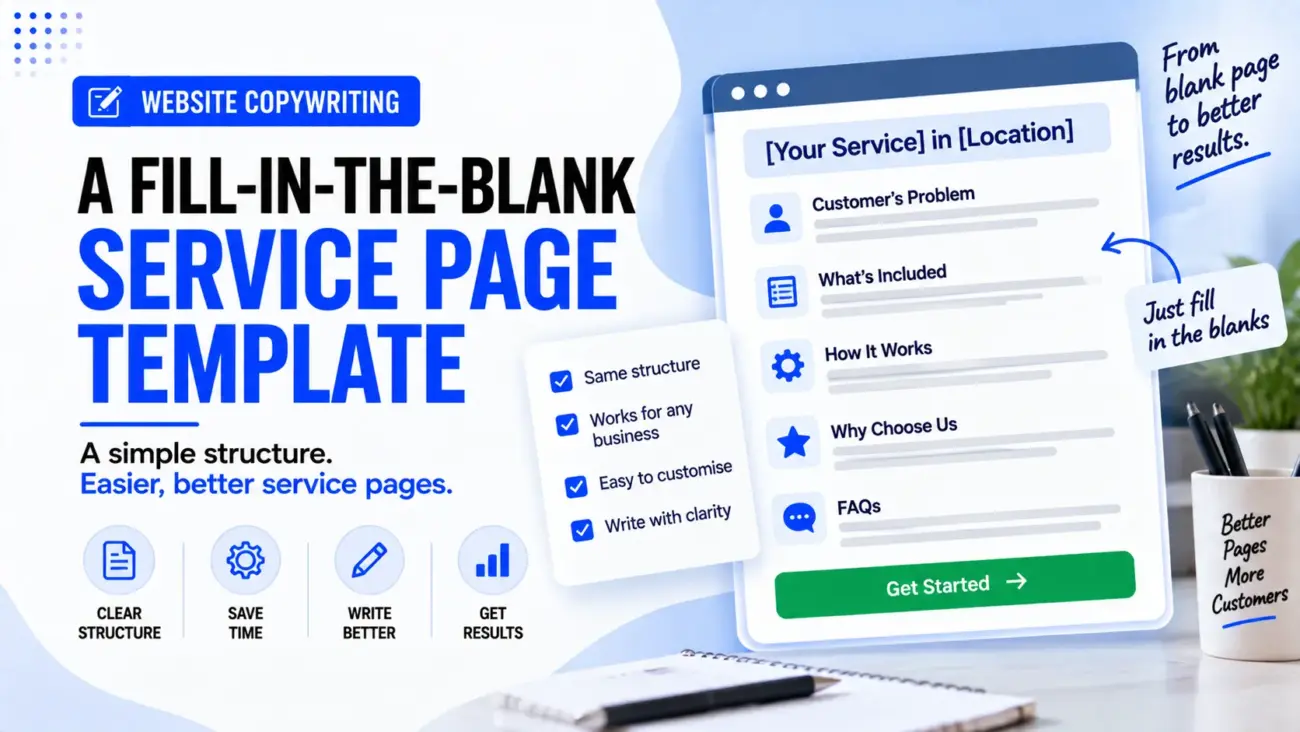
Writing a service page from a blank WordPress editor can be harder than it looks. We may know what the business does, but once we start writing, it is easy to repeat the same points, add too much information in the wrong places or create a page that sounds like every other service page on the website. A useful service page template can solve this problem by giving us a clear structure while still leaving enough space for the actual business, service and customer to shape the final copy.
A good service page should do more than explain what a business offers. It should help a visitor understand whether the service is right for them, what the business actually does, why they should consider it, what the process looks like and what they should do next. Google also recommends creating useful, descriptive content for people, while its current local business guidance shows the value of providing accurate business details that help users understand the business.
That is why this service page template is designed as a fill-in-the-blank framework rather than a fixed article that every business should copy word for word. We can use the structure for plumbers, electricians, cleaning companies, interior designers, pest control businesses, photographers, accountants, repair companies and many other service businesses, while changing the actual information to match the service and customer.
What A Service Page Actually Needs To Do?
Before filling in a template, we need to understand the job of the page. A service page exists for a particular service, so the visitor should not have to search through the whole website to understand what is being offered. At the same time, the page should not simply repeat the same company introduction, generic benefits and contact details that appear on every other page.
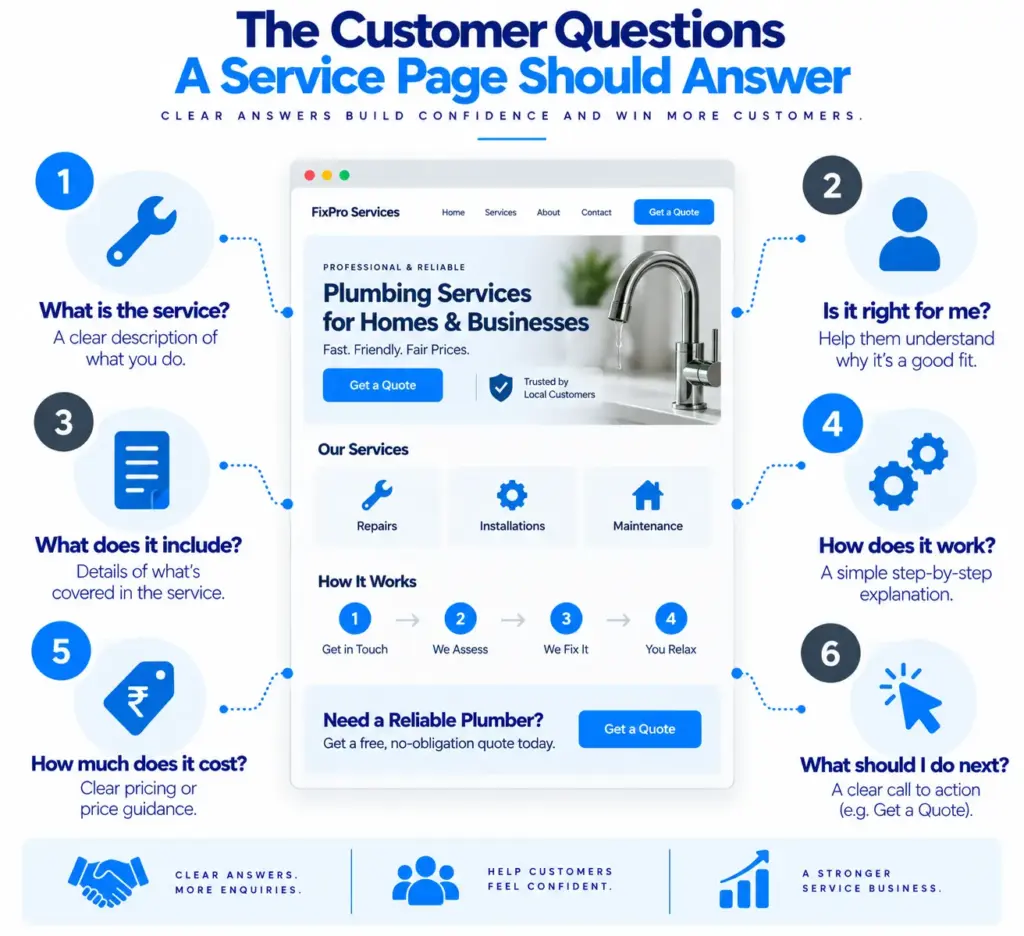
A useful service page structure follows the questions a potential customer is likely to have. The visitor first wants to know whether they have reached the right place, then they want to understand what the service includes, whether the business can handle their situation, what the process involves and how they can take the next step. The page should answer those questions in a natural order rather than forcing the reader to work them out.
For most local businesses, the basic journey looks something like this:
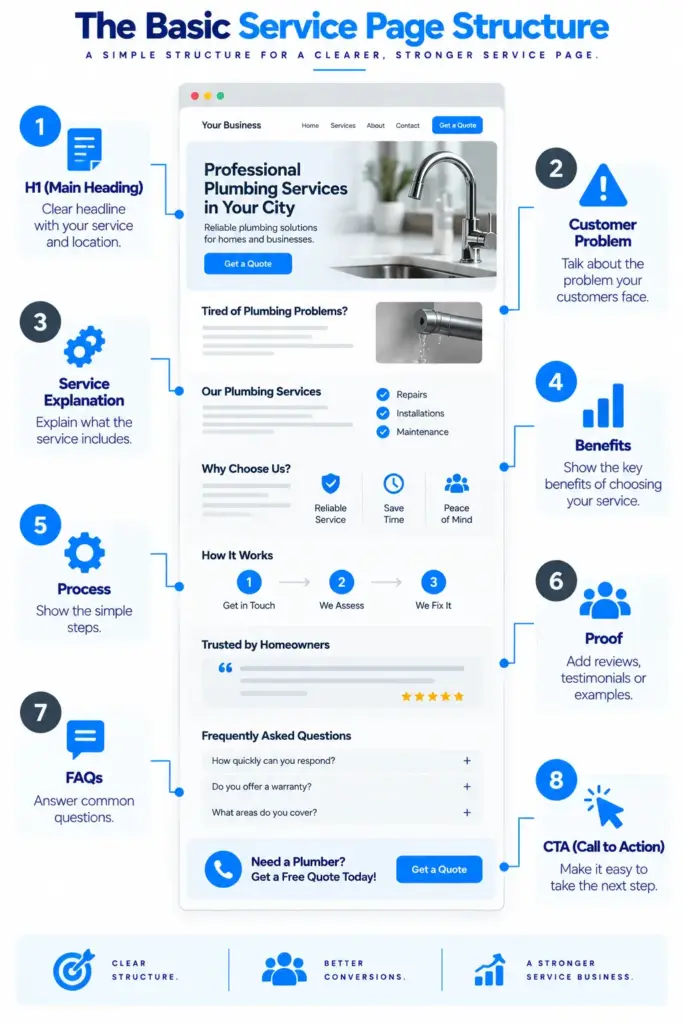
Problem → Service → Fit → Benefits → Process → Proof → Questions → Action
This is the thinking behind the service page template below.
The Fill-In-The-Blank Service Page Template
The following structure can be copied into a draft and filled in before the final writing begins.
1. H1: [Main Service] In [Location]
Start with a clear heading that tells the visitor exactly what the page is about.
Template:
[Main Service] For [Type Of Customer] In [Location]
Or, when the location is not important:
[Main Service] For [Type Of Customer]
Example
Bathroom Renovation For Homes In Ghaziabad
or:
Professional Pest Control For Homes And Businesses
The headline should not try to explain everything. Its main job is to make the page immediately understandable.
If the business needs help writing local headlines, this can connect naturally with our existing content.
Our earlier article, “How to Write a Headline for a Local Service Website” explains how the main service and customer should be communicated clearly in the first section.
2. Opening Paragraph: Identify The Customer’s Problem
The first paragraph should connect the service with the reason someone may be looking for it.
Fill-in-the-blank formula:
If you need [service] because [common problem or need], [business name] provides [main service] for [customer type] in [location]. We help with [specific situation 1], [specific situation 2] and [specific situation 3], with [important service feature or process detail].
The second paragraph can explain what the visitor will get from the service without turning the introduction into a long company story.
Our [service] is designed for [customer type] who need [main outcome] without [common concern or difficulty]. We explain [process, scope, pricing or preparation] clearly before the work begins, so customers know what to expect and what the next step will be.
This is usually much more useful than beginning with:
“We are a leading company with years of experience…”
Experience can be important, but the visitor has arrived because they have a problem or need. Start there.
3. Explain What The Service Includes
The next section should make the service concrete.
A common mistake in service page content templates is writing one large paragraph that says the business provides “complete” or “professional” services without explaining what those words actually mean.
Instead, tell the reader what is included.
What Does [Service] Include?
Our [service] can include [specific task 1], [specific task 2], [specific task 3] and [specific task 4], depending on the customer’s requirements. We first understand the condition of [property/project/problem] and then recommend the work that is actually needed rather than adding services that do not apply.
If there are several important parts of the service, use short subheadings.
[Service Element 1]
Explain what it means and when a customer may need it.
[Service Element 2]
Explain what the business actually does.
[Service Element 3]
Explain what the customer can expect.
This is better than filling the page with a long list of keywords because each section gives the visitor information they can use.
4. Explain Who The Service Is For
Not every visitor has the same need, even when they search for the same service.
A cleaning company may serve homeowners, landlords and businesses. An interior designer may work with apartment owners, homeowners building houses and commercial clients. An electrician may handle both small household repairs and larger commercial jobs. The service page should make it clear who the service is suitable for instead of leaving every visitor to guess.
Is [Service] Right For You?
Our [service] is suitable for [customer type 1], [customer type 2] and [customer type 3] who need [main requirement]. It may be particularly useful when [situation 1], [situation 2] or [situation 3] applies. If you are unsure whether the service is suitable for your situation, [explain how the customer can contact the business].
This section is especially useful for specialist services because it helps the visitor decide whether they are looking at the right page.
5. Turn Features Into Customer Benefits
This is one of the most important parts of a service page copy template.
Businesses often describe what they do without explaining why it matters.
For example:
“We use digital project planning.”
That is a feature.
A customer-focused version could be:
“Digital project planning helps us keep the work, timings and agreed requirements organised, so customers can see what has been planned before the project moves forward.”
The feature explains what the business does. The benefit explains why the customer should care.
A useful formula is:
We [feature], so [customer benefit].
For example:
We provide written quotations, so customers can review the expected work and cost before deciding whether to proceed.
We use scheduled appointment slots, so customers know when the technician is expected to arrive.
We provide design drawings before construction, so clients can review the proposed layout before work begins.
These statements are much stronger than simply writing “professional”, “reliable” or “high-quality” without evidence.
6. Explain The Process Step By Step
Customers often hesitate because they do not know what happens after they contact a business.
A simple process section can remove that uncertainty.
How Our [Service] Works
Step 1: [Initial Contact]
Tell us about [problem/project/requirement] through [phone/form/WhatsApp/booking system].
Step 2: [Assessment]
We [visit/review/inspect/discuss] the requirement and identify [important information].
Step 3: [Recommendation or Quote]
We explain [recommended work/options/pricing] so you can decide how you want to proceed.
Step 4: [Service Delivery]
Once the work is agreed, we [describe actual service].
Step 5: [Completion or Follow-Up]
After the service, we [check/clean/review/follow up/provide documents] where applicable.
The exact number of steps does not matter. The important thing is that the process reflects what the business actually does.
A service website copy template should never invent a process simply because it looks good on the page.
7. Explain What Makes The Service Different
The next section should answer a question that customers may not ask directly:
Why should I choose this business instead of another one?
Avoid writing:
“We are the best company in the city.”
That is difficult to prove and does not explain anything.
Instead, identify genuine differences.
Why Choose [Business Name] For [Service]?
Customers choose us for [specific reason 1], [specific reason 2] and [specific reason 3]. We focus on [specific approach], which means customers receive [real customer benefit]. Before starting the work, we [actual practice], so there is a clear understanding of what the service involves.
Possible areas to explore include:
- Specialist experience
- Local knowledge
- Clear quotations
- Specific qualifications
- Flexible scheduling
- A particular service method
- After-service support
- A defined type of customer
- A useful guarantee, if genuine
- A clear communication process
The important point is to use real differences rather than marketing words that could describe every competitor.
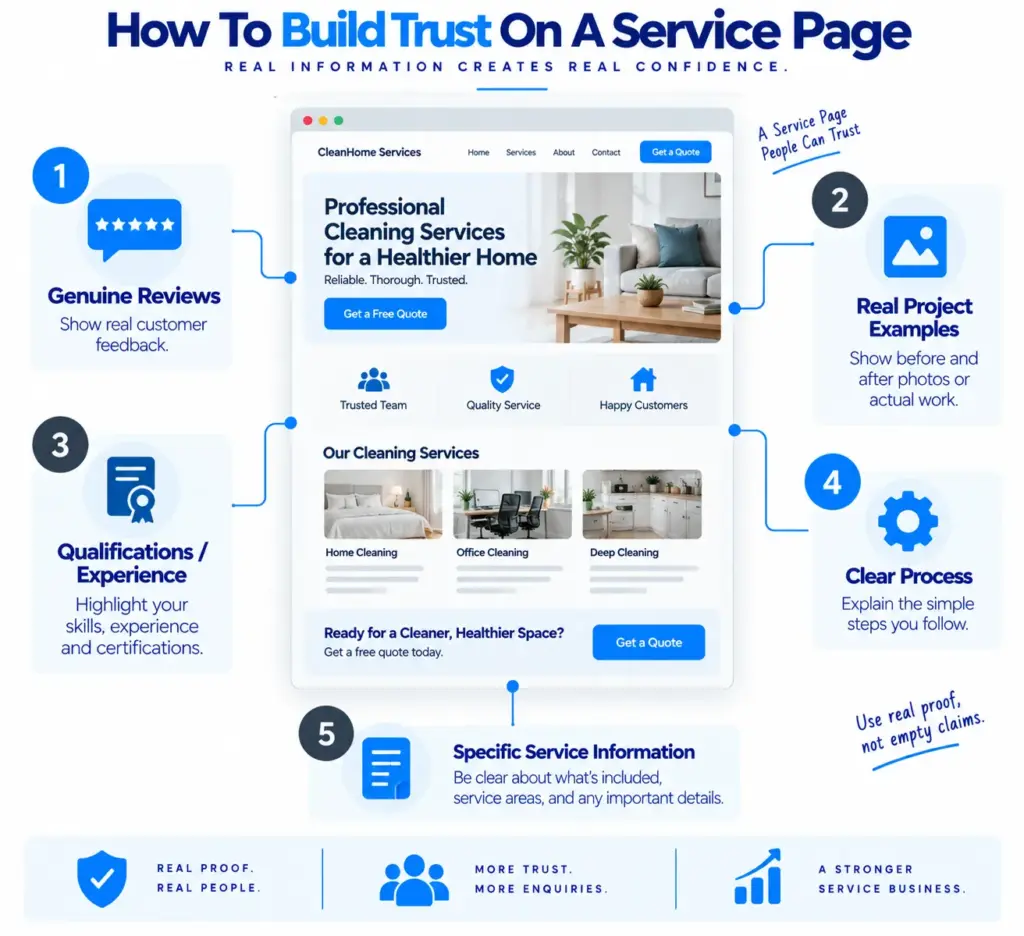
8. Add Proof At The Right Point
A visitor may understand the service but still wonder whether the business can actually deliver it.
This is where proof helps.
A service page can use:
- Genuine customer reviews
- Relevant project examples
- Before-and-after photographs
- Case studies
- Qualifications
- Certifications
- Years of relevant experience
- Number of completed projects, if accurate
- Local examples
The proof should support the claims already made on the page.
For example, if we say the business specialises in bathroom renovations, a short project example showing an actual bathroom renovation is more useful than a generic statement saying “We have many happy customers.”
Google’s current local business documentation also highlights business information such as address, telephone, website, images and other relevant details as ways to provide more information about a business.
If the website publishes reviews, make sure they are genuine. Google has specific rules around review structured data and does not allow businesses to use their own controlled reviews in certain review-rich-result situations.
9. Deal With The Customer’s Common Concerns
A strong service page content template should leave room for questions.
Think about what could stop someone from contacting the business.
They may be thinking:
“How much will this cost?”
“How long will it take?”
“Do you serve my area?”
“Do I need to prepare anything?”
“Will someone visit first?”
“What happens if the problem is different from what I expected?”
“Can I book a specific date?”
The page does not need to answer every possible question, but the most important concerns should be covered.
Before You Book [Service]
Before booking, customers should know [important requirement]. Depending on the project, we may also need [information, measurements, photographs or inspection] so that we can understand the work properly. If the final requirement differs from the initial description, we will explain what has changed before proceeding with additional work.
This type of information can be much more persuasive than another paragraph about how committed the business is.
10. Add Pricing Information When It Makes Sense
Not every service has a simple fixed price.
A plumber may need to inspect a problem. An interior designer may need to understand the project size. A photographer may have different packages. A cleaner may have prices based on property size and frequency.
That does not mean the page should say nothing about money.
A service page can explain:
Pricing For [Service]
The cost of [service] depends on [main pricing factors]. For example, [factor 1], [factor 2] and [factor 3] can affect the final price. Contact us with [required information] and we can explain the available options.
If the business has fixed prices, show them clearly.
If it has packages, explain what each package includes.
If pricing is genuinely quote-based, explain why.
Our earlier article, “Website Pricing Strategy: Should You Put Prices on Your Website?” explains whether the service page should display fixed prices, starting prices, ranges or quote-based pricing.
11. Add A Local Section When Location Matters
For a local business, the service page may need to explain where the service is available.
Areas We Serve For [Service]
We provide [service] across [main city/area], including [area 1], [area 2] and [area 3]. Availability may depend on the exact address and type of work, so customers can [contact method] to confirm whether we cover their location.
The important part is to list genuine service areas.
Do not create a long list of cities simply to add location keywords. If several locations need their own pages, each page should have a real reason to exist and enough useful local information to stand on its own. Google’s canonicalisation guidance explains that highly similar pages can be clustered and one representative version selected, so copying the same service page across many locations is not a good content strategy.
12. Write Useful FAQs
FAQs should answer real questions, not exist simply to add more keywords.
For a service page, three to six useful questions are often enough.
Frequently Asked Questions
How long does [service] usually take?
The time required depends on [main factors]. Smaller jobs may take [accurate range if available], while larger projects can require more time. We will explain the expected timeframe before the work begins.
Do I need to prepare anything before the service?
Before the appointment, customers may need to [specific preparation]. We will explain anything required when the booking is arranged.
Do you provide [related service]?
Yes, we provide [related service] when [condition]. If the requirement is outside our usual service, we can explain whether another option is available.
How do I get a quote?
Contact us through [form/phone/WhatsApp] and provide [required information]. We will then [explain next step].
The answers should be written for people first. Google’s current Search documentation continues to emphasise helping search engines understand page content, but structured data and search features should support useful content rather than replace it.
13. Finish With A Clear Call To Action
The final section should not suddenly become aggressive.
If the page has explained the service properly, the CTA can be simple.
Ready To Discuss [Service]?
If you need [service] in [location], contact [business name] to discuss your requirement. Tell us [information needed], and we will explain the next step and whether the service is suitable for your situation.
Then use the action that matches the business:
[Request A Quote]
[Book An Appointment]
[Call Us]
[Send An Enquiry]
[Message Us On WhatsApp]
The CTA should describe what actually happens when someone clicks it.
A button saying “Get Started” may sound neat, but “Request A Quote” tells the customer much more.
The Complete Fill-In-The-Blank Version
Once all the sections are understood, the service page template can be reduced to a simple working document.
H1: [Main Service] For [Customer] In [Location]
Introduction
If you need [service] because [problem/need], [business] provides [service] for [customer] in [location]. We help with [specific situations] and explain [important process detail] before the work begins.
What Is [Service]?
[Simple explanation of the service and why customers may need it.]
What Does The Service Include?
Our service includes [item 1], [item 2], [item 3] and [item 4], depending on [condition].
[Service Element 1]
[Explanation]
[Service Element 2]
[Explanation]
[Service Element 3]
[Explanation]
Who Is This Service For?
This service is suitable for [customer types] who need [need].
Benefits Of [Service]
We [feature], which helps customers [benefit].
We [feature], which means [benefit].
How Our [Service] Works
Step 1: [Initial contact]
Step 2: [Assessment]
Step 3: [Quote/recommendation]
Step 4: [Service]
Step 5: [Completion/follow-up]
Why Choose [Business Name]?
Customers choose us because [specific reason 1], [specific reason 2] and [specific reason 3].
Proof
[Review/project/case study/qualification]
Pricing
The cost depends on [factors]. Contact us with [information] to discuss [quote/price/package].
Areas We Serve
We provide [service] in [location], including [areas], subject to [conditions].
FAQs
[Question 1]
[Answer]
[Question 2]
[Answer]
[Question 3]
[Answer]
[Question 4]
[Answer]
CTA
Need [service]? Contact [business] to [desired action].
[CTA BUTTON]
This is the core service page copy template that can be reused across many local business websites.
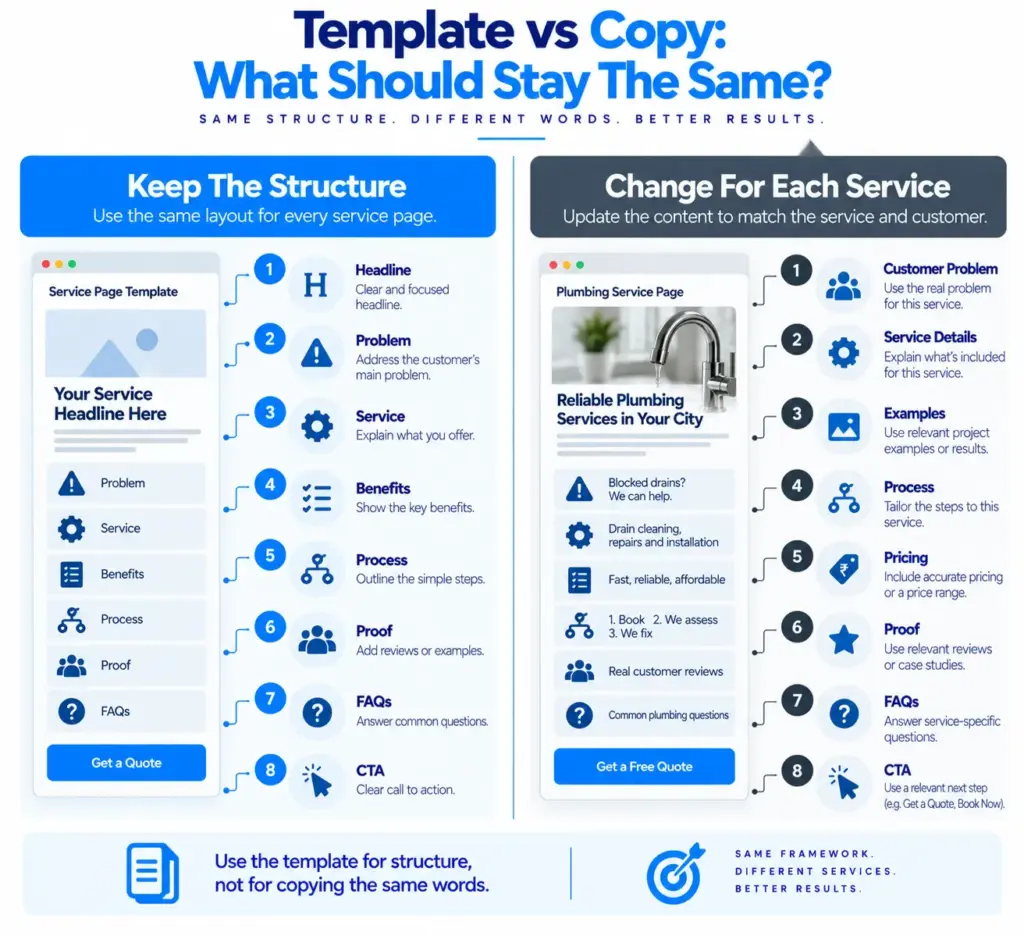
Do Not Copy The Same Template Word For Word Across Every Service
A template should provide structure, not replace thinking.
For example, a plumber’s service page may need sections about emergencies, property access, inspection and repair. An interior designer’s page may need sections about consultation, design stages, materials, drawings and project management. A pest control page may need treatment preparation and follow-up information.
The same basic structure can still work, but the questions and examples should change.
This is important for SEO as well as usability. If every service page contains almost exactly the same text with only the service name changed, the website may become repetitive and less useful. Google explains that when pages have very similar primary content, they can be clustered as duplicates and a representative canonical page may be selected.
The better approach is to keep the structure consistent while making the information specific to each service.
A Quick Service Page Audit Before Publishing
Once the page is written, read it from the customer’s point of view rather than checking only whether the keyword appears.
Ask:
- Can I understand the service from the first section?
- Can I tell whether this service is suitable for me?
- Does the page explain what is included?
- Does it explain the process?
- Does it give a real reason to choose the business?
- Is there evidence supporting important claims?
- Can I understand the pricing approach?
- Can I see where the service is available?
- Have my main questions been answered?
- Do I know what to do next?
If several answers are no, adding more words will not necessarily solve the problem. The page probably needs better information or a clearer structure.
This is where a wider website content checklist can help.
Our earlier article, “The 30-Point Website Copy Checklist” explains the final review of service page clarity, structure, trust, CTAs and usability.
How To Make The Template More Useful For Local Businesses
A local business service page template should contain enough information to make the page useful to someone who is actually considering the service in that area.
For example, a local electrician could mention the areas served, the types of properties handled and how emergency enquiries work. A cleaning company could explain whether it handles one-time and recurring cleaning. A wedding photographer could explain the booking process, travel area, package structure and delivery timeline.
The local element should be real rather than added only for SEO.
If the business has a physical location, accurate details such as its address, telephone number, website and other relevant information can also help users understand the business. Google recommends providing applicable business details and using the most specific LocalBusiness type where structured data is appropriate.
This is why a good service page template leaves space for business-specific information instead of trying to solve every business with exactly the same paragraph.
Final Thoughts
A blank service page can feel difficult because there are too many possible things we could write. We can talk about the company, the service, the benefits, the process, the price, the location, customer reviews and many other details, but without a clear order, the page can quickly become repetitive or confusing.
A good service page template gives us a starting point.
It helps us begin with the customer’s problem, explain the service, show who it is for, turn features into useful benefits, describe the process, provide real proof, answer common questions and finish with a clear next action. The exact sections can then be changed depending on the type of business and the service being offered.
The most important thing is not to copy this structure mechanically. The structure should stay fairly consistent because customers often ask similar questions, but the actual answers need to come from the business. A plumber should not sound like an interior designer, and a pest control company should not use the same examples as a wedding photographer.
That is also why a service page content template is better thought of as a writing framework rather than a finished piece of copy. It gives us the order, but the business provides the information, examples, proof and details that make the page worth reading.
Before publishing, read the finished page once without thinking about SEO. Ask whether a real customer could understand the service, decide whether it fits their needs and know what to do next. If the answer is yes, the template has done its job.
The best service page template is not the one that gives us the most sections. It is the one that helps us create a page that answers the customer’s questions clearly while still sounding like the actual business behind it.