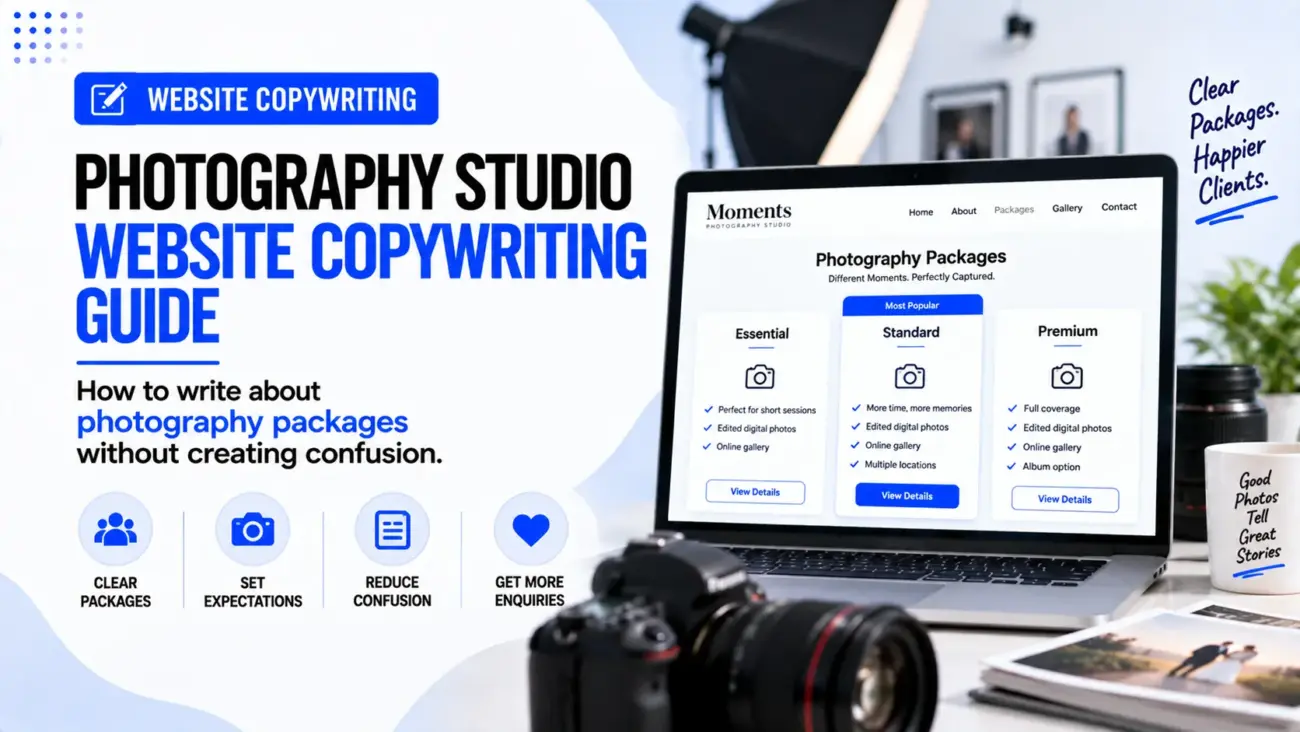
A photography website can have beautiful photographs and still leave potential clients confused about what they are actually buying. This usually happens when the website shows a gallery, a few package names and some prices, but does not explain the difference between the packages in simple language. A visitor may like the photographer’s work but still leave the website because they cannot understand how many hours are included, how many photographs they will receive, whether editing is included, when the photos will be delivered or what happens after booking.
This is where Photography Studio Website Copywriting becomes important. The job is not only to describe how good the photographs look. The website also needs to explain the service in a way that helps a customer choose the right package without having to send several messages just to understand the basics. Good package wording should make the offer easier to compare while leaving enough flexibility for customers who need something different.
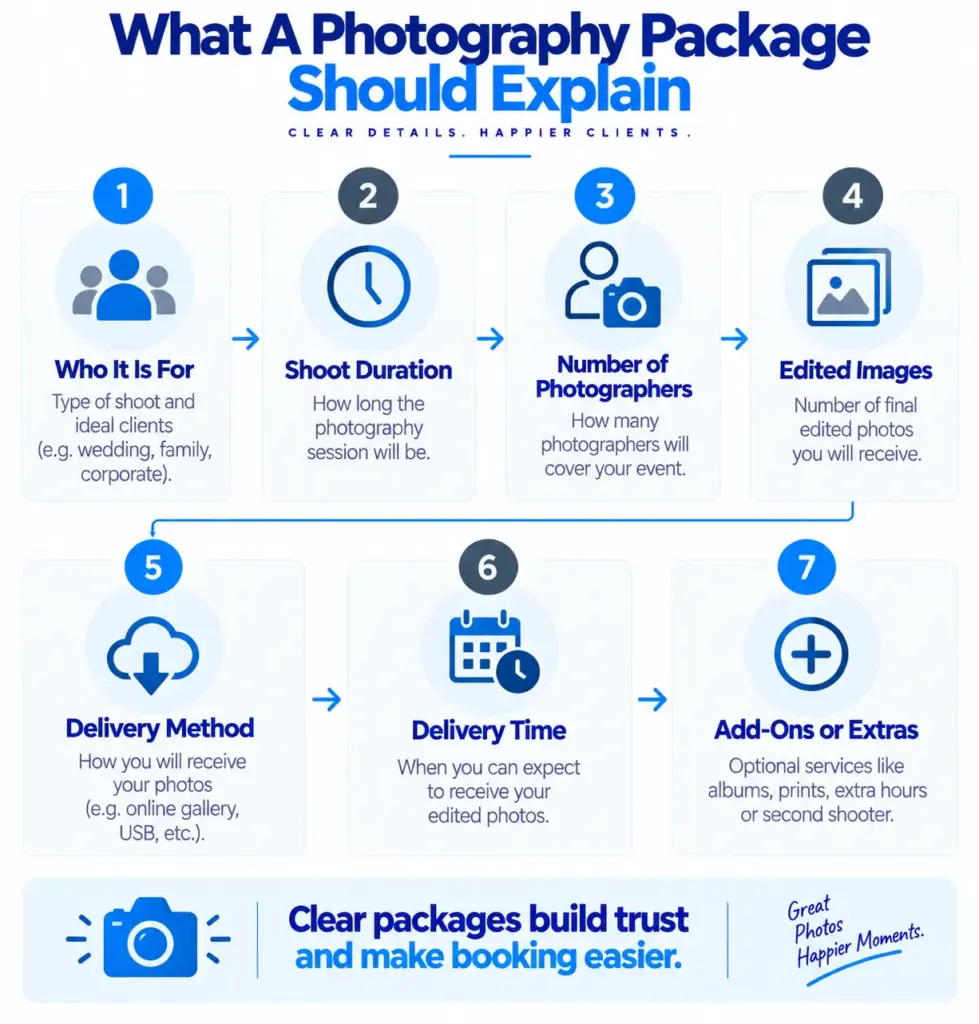
A photography package is essentially a combination of time, creative work and deliverables. It may include the photography session itself, edited images, an online gallery, prints, an album, a second photographer, additional hours or other services. The exact combination will depend on the type of photography, but the writing should always make the boundaries clear. This is one of the most important parts of Photography Studio Website Copywriting because unclear package wording can create questions before the customer has even made an enquiry.
Why Photography Packages Become Confusing
Photography packages often become confusing because photographers know their own process very well, while customers do not. A photographer may understand the difference between edited, retouched, high-resolution and final images immediately, but a first-time customer may not know what any of these terms mean. The same problem can happen with phrases such as “full-day coverage”, “unlimited photos”, “cinematic album”, “premium editing” or “two looks”, because the customer may interpret them differently from the photographer.
Another problem is that some packages contain too many small details without explaining the main difference between them. A page might list ten features under each package, but if the customer cannot see why Package B is different from Package A, the extra information does not really help. Current photography pricing guidance also recommends making package inclusions, coverage, deliverables and the next step clear rather than making visitors work out the offer from a long list.
Good Photography Website Content should therefore answer a simple question for every package: “What kind of customer is this package suitable for, and what will that customer receive?” Once that is clear, the individual features become much easier to understand.
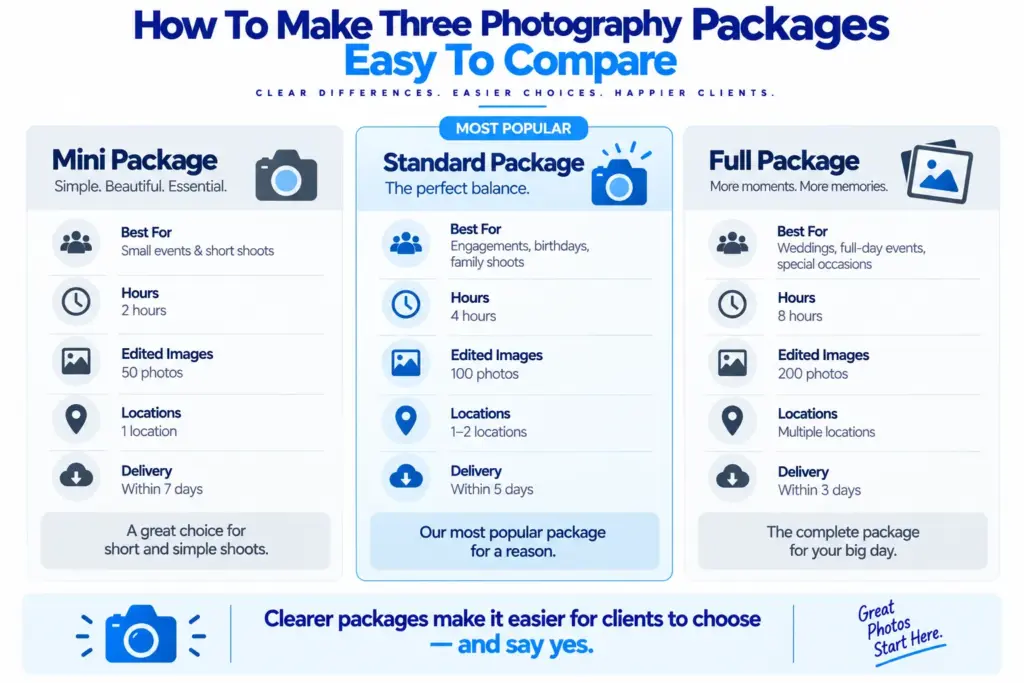
Start With Who The Package Is For
One of the easiest ways to improve Photography Package Wording is to explain who each package is designed for. Instead of making the visitor compare three almost identical lists, give each package a simple description.
For example:
Mini Session
Best for: Individual portraits, quick family updates or professional headshots.
Standard Session
Best for: Families, couples or personal branding sessions that need more time and more final images.
Full Session
Best for: Customers who want several locations, outfit changes or a longer photography session.
This small line can make the package structure much easier to understand because the customer can start with their own need instead of starting with the price.
The same approach works for wedding photography. Instead of simply writing “Silver”, “Gold” and “Platinum”, the website could explain that one package is suitable for a short ceremony, another is designed for a full wedding day, and another includes additional coverage or products. The exact package names do not matter as much as the explanation beneath them.
Do Not Make The Package Name Do All The Work
Creative package names can look attractive, but they should not be expected to explain the offer on their own. Names such as “Signature”, “Classic”, “Elite” or “Memories” may sound good, but they do not tell a visitor what is included.
A better structure is:
Signature Package
Full-day wedding coverage for couples who want photography across the main wedding events.
Includes:
- Up to 10 hours of coverage
- Two photographers
- Edited digital images
- Online gallery
- Album option
The package name can add personality, while the description does the practical work.
This is especially important for Photography Studio Website Content because customers often scan pricing pages rather than reading every word. A clear package name followed by a short explanation helps them understand the page more quickly.
Explain The Number Of Hours Clearly
“Full day” can mean different things to different people, so it is better to give a clear number when the service has a fixed coverage period. If a package includes eight hours, write eight hours rather than simply writing “full-day photography”.
For example:
8 hours of photography coverage
Suitable for weddings that need coverage from the preparation through the main reception events.
If the package has flexible coverage, explain what that means. If overtime is possible, explain how additional hours are handled rather than leaving customers to ask later.
This is useful because time is one of the main things customers compare when looking at photography packages. Two packages may appear similar until the customer notices that one includes four hours and another includes eight.
The writing should also avoid creating an impression that the photographer will be physically shooting every minute of the stated period if that is not how the service works. The package should describe the actual service accurately.
Explain What “Edited Photos” Means
The phrase “edited photos” can be confusing because editing can mean different things to different photographers and customers. Some customers may expect basic colour correction, while others may assume every photograph receives detailed skin retouching.
The website does not need to provide a technical lesson on photo editing, but it should explain the deliverable in simple terms.
For example:
300 edited digital images
Final selected images are colour-corrected and edited in our usual photography style and delivered through an online gallery.
If detailed retouching is included only for selected photographs, say so:
Retouching: Detailed skin and portrait retouching is included for 10 selected images.
This is much clearer than simply writing “professional editing included”.
The same principle applies to the phrase “unlimited images”. If the photographer delivers all suitable edited images from a session, explain that clearly. If there is a selection process, explain that instead. Customers should understand what they are likely to receive.
Tell Customers How Many Images They Receive
One of the most useful parts of Photography Studio Website Copywriting is making image quantity clear. Customers often want to know not only how long the photographer will be present but also what they will receive afterwards.
A package could say:
Approximately 300–400 edited images
Final image count depends on the length and type of the event.
Or:
Up to 40 edited images
Choose your final photographs from a proof gallery.
The exact wording should match the photographer’s actual delivery process. If there is no guaranteed minimum, do not write a guaranteed number just because it looks more attractive on the page.
For commercial or product photography, the same idea can be expressed differently:
Up to 20 products
Includes 3 final images per product.
That is more useful than simply saying “product photography included”.
Explain Delivery Instead Of Just Saying “Online Gallery”
“Online gallery” tells the customer how the photographs may arrive, but it does not tell them when they will receive them or what they can do with them.
A clearer package could say:
Online gallery delivery
Your final edited photographs will be delivered through a private online gallery within 21 days of the shoot.
If the delivery time varies, explain the normal range:
Gallery delivery: Usually within 2–3 weeks, depending on the size of the project.
If the photographer offers a faster preview, that can also be stated:
Preview images: A small selection is shared within 48 hours.
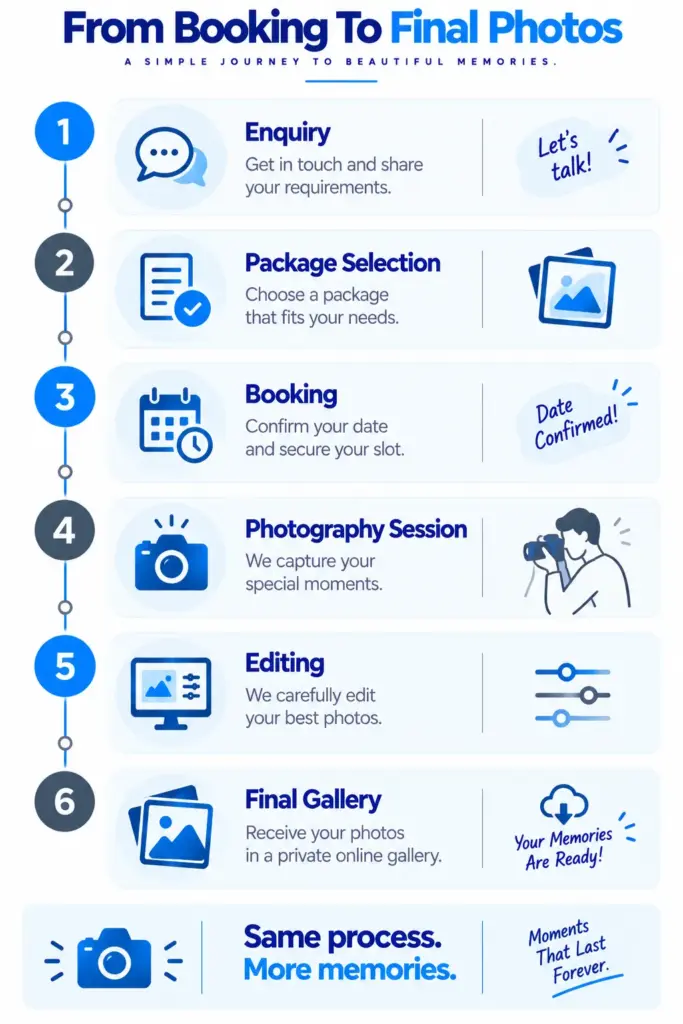
These details make Photography Website Content much more useful because the customer can understand the complete journey rather than only the shooting part.
Make The Difference Between Packages Easy To See
If a photography studio has three packages, the visitor should be able to understand the main difference between them without reading every word.
For example:
| Mini | Standard | Full | |
|---|---|---|---|
| Session time | 1 hour | 2 hours | 4 hours |
| Edited images | 15 | 40 | 80 |
| Locations | 1 | Up to 2 | Up to 3 |
| Outfit changes | 1 | 2 | 3 |
| Online gallery | Yes | Yes | Yes |
The exact details will depend on the studio, but the principle is useful. A comparison table should make meaningful differences visible rather than simply repeating the same features three times.
The copy underneath each package can then explain who it suits.
This is much easier to understand than:
Basic — ₹X
Premium — ₹Y
Luxury — ₹Z
with three large lists containing almost the same words.
Do Not Add Too Many Packages
A photography website can also create confusion by offering too many choices. A customer may see Mini, Basic, Classic, Standard, Premium, Signature, Deluxe, Gold and Platinum packages, each with slightly different combinations of hours, photographs and products.
The problem is not that more packages are always wrong. The problem is that the visitor may struggle to see the difference between them.
For many services, two or three main packages can provide a clearer starting point, with optional extras for customers who need something different. Current photography pricing guidance commonly recommends a small number of clearly differentiated packages rather than a long list of nearly identical options.
If a studio has many types of photography, it can instead separate the services first. For example:
Wedding Photography
Packages A, B and C.
Family Photography
Sessions A, B and C.
Corporate Photography
Half-day and full-day options.
This makes the page easier to scan because customers only compare packages that are relevant to them.
Explain Add-Ons Separately
Not every customer needs every extra service, so putting every possible add-on inside the main package can make the package unnecessarily complicated.
A better approach is to keep the main package simple and show optional services separately.
For example:
Optional Extras
- Additional photography hour
- Extra photographer
- Additional retouched images
- Printed photographs
- Photo album
- Framed prints
- Same-day preview
- Rush delivery
The exact list should match the studio’s services.
The copy should also explain whether an add-on is available for all packages or only selected packages. This prevents customers from choosing a package and discovering later that an important extra is unavailable.
For Photography Studio Website Copywriting, the main package should answer the core need first, while add-ons should handle customers who want something beyond the standard offer.
Be Careful With “Unlimited” And “All-Inclusive”
Words such as “unlimited” and “all-inclusive” sound simple, but they can create confusion if the business does not define them properly.
For example, “unlimited photos” could mean unlimited shooting time, unlimited photographs taken, unlimited edited photographs or unlimited downloads. These are very different things.
Instead of:
Unlimited Photography
write:
Unlimited photographs during the booked coverage period
All suitable final images are edited and delivered through the online gallery.
Or, if only the number of photographs taken is unlimited but the delivered selection is limited, explain that distinction.
The same applies to “all-inclusive”. If albums, prints, travel, taxes, additional hours or extra photographers are not included, the phrase can create the wrong expectation.
Simple words are usually safer because they leave less room for interpretation.
Should Photography Prices Be Shown On The Website?
There is no single pricing format that works for every photography studio. Some photographers can show fixed package prices because their service is standardised, while others need to create a custom quote because the project varies significantly.
However, even when a final price needs to be customised, a website can often provide useful starting information. Current photography pricing-page guidance commonly recommends showing package information and, where appropriate, starting prices so customers can understand the general offer before making contact.
For example:
Portrait sessions from ₹X,XXX
Final pricing depends on session length, location and selected deliverables.
Or:
Wedding photography packages from ₹XX,XXX
Tell us your date and location and we will recommend the suitable package.
This approach gives the customer some pricing context without pretending every project costs the same.
Our earlier article, “Website Pricing Strategy: Should You Put Prices on Your Website?” explains whether the photography studio should show fixed prices, starting prices or custom quotations.
Use A “Best For” Line Instead Of “Best Package”
A package can be easier to choose when the website explains who it is suitable for, but be careful with phrases such as “best package” or “most popular” unless the business genuinely has evidence for those claims.
Instead, use:
Best for: Couples who want full-day wedding coverage.
Or:
Best for: Families who want a longer session with multiple outfit changes.
This is useful because it connects the package to a real customer need without making an unsupported sales claim.
If the studio really knows that one package is selected most often, it can say “Most booked” if that is accurate and current. The website should not label a package “Most Popular” simply because it wants visitors to choose it.
Write Package Copy Around Outcomes, Not Just Features
Photography packages contain many features, but customers are usually interested in what those features allow them to do.
For example:
Feature: Two-hour photography session.
More useful wording: Two hours gives enough time for a relaxed family session with outfit changes and several group combinations.
Or:
Feature: Online gallery.
More useful wording: View and download the final edited photographs from a private online gallery.
Or:
Feature: Two photographers.
More useful wording: Two photographers can cover different parts of the event at the same time.
The point is not to turn every feature into a marketing sentence. It is to explain the feature when the customer may not immediately understand why it matters.
This is one of the core ideas in Photography Studio Website Copywriting: features should be clear first, and benefits should explain the practical reason behind important features.
Show What The Package Looks Like Through Real Photography
A photography website should not make the package page entirely text-heavy. The photographs themselves are part of the sales explanation.
If the studio is selling wedding photography, show examples from the type of wedding coverage included. If the package is for family portraits, show a suitable family gallery. If the service is product photography, show examples that match the type of products the studio normally photographs.
This is important because customers are not only buying a number of photographs. They are choosing a visual style and deciding whether they like the photographer’s way of working.
A useful package page can therefore combine a short explanation with carefully selected images instead of putting a huge gallery below a large block of pricing information.
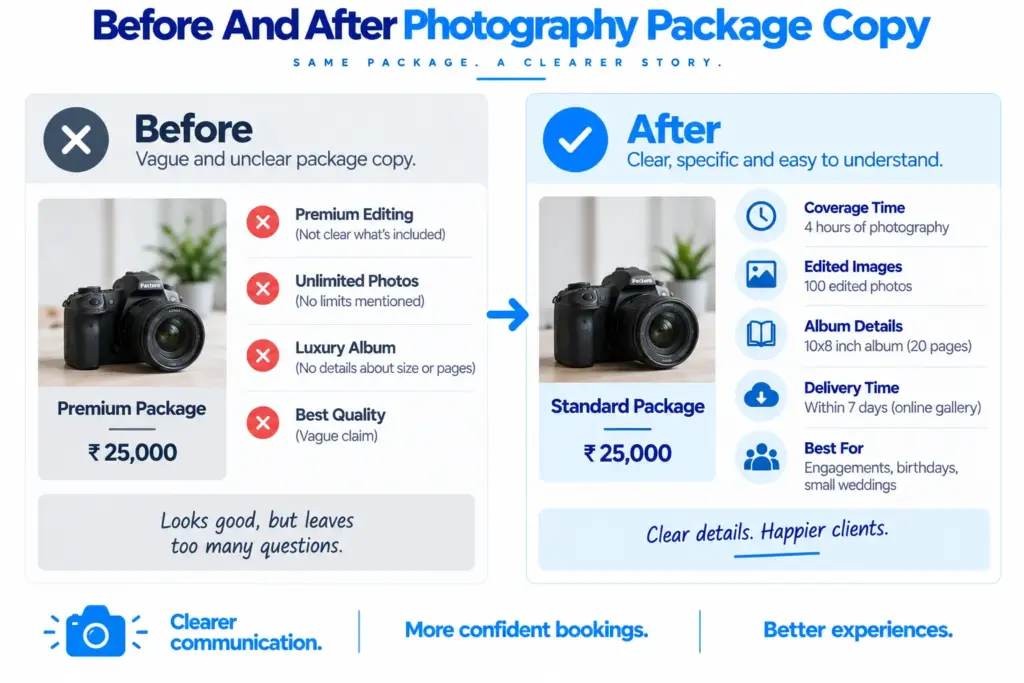
Before And After: Photography Package Wording
Consider this example.
Before
Premium Package — ₹XX,XXX
8 hours | 2 photographers | Unlimited photos | Premium editing | Luxury album | Cinematic video | Online delivery | Best quality | Professional service
This looks full, but the customer still has several questions. How many final images are included? What does premium editing mean? What type of album? How long is the video? When are the photographs delivered?
After
Full-Day Wedding Package — ₹XX,XXX
Best for: Couples who want coverage from the preparation through the main reception events.Includes up to 8 hours of photography with two photographers, a curated set of professionally edited digital photographs, a private online gallery and a [specific album/video deliverable if genuinely included]. Final gallery delivery is usually within [X] weeks.
Optional extras: Additional coverage, extra albums and selected print products are available if required.
The second version is longer in total, but it is easier to understand because every important part has a clear meaning.
Add A Simple Booking Next Step
A pricing page should not end with the package list. Once someone has understood the packages, the website should tell them what to do next.
The next step could be:
Check Your Date
Tell us your photography date, location and preferred package, and we will confirm availability.
Or:
Ask About A Package
Send us your event details and we will help you choose the suitable option.
Or:
Book A Session
Choose your preferred date and tell us what type of session you need.
The button should match the actual process. If the photographer does not have an online booking system, do not use “Book Now” if clicking it only opens a general enquiry form. “Check Availability” may be more accurate.
Our earlier article, “15 Call to Action Button Examples for Local Business Websites” explains how the final package CTA should tell visitors what they can do next.
Ask For The Information That Actually Matters
A photography enquiry form should not ask for twenty pieces of information before allowing the customer to make contact. The required information depends on the photography type, but useful fields may include the date, location, photography type and contact details.
For wedding photography, the form might ask:
- Wedding date
- City or venue
- Type of event
- Approximate coverage required
- Name
- Phone or email
For a portrait studio, it may ask for:
- Preferred date
- Session type
- Number of people
- Preferred location
- Contact details
The form can then ask additional questions after the initial enquiry if necessary.
The important point for Photography Studio Website Content is that the enquiry process should continue the clarity created by the package page rather than making the customer repeat information that the website already explained.
Keep Package Terms Clear
Photography packages can involve important terms around deposits, cancellation, rescheduling, image delivery, usage rights, travel and album production. These do not all need to appear in large text beside the package price, but customers should be able to find the relevant information before booking.
For commercial photography, usage rights may be particularly important because a business may want to use photographs on its website, advertising, packaging or social media. The package should make clear what usage is included when this is relevant to the service.
For wedding and portrait photography, the studio may need to explain delivery, rescheduling and album details instead.
The key is to avoid putting important conditions in tiny or hidden text. If a term can materially change what the customer receives, it deserves clear wording.
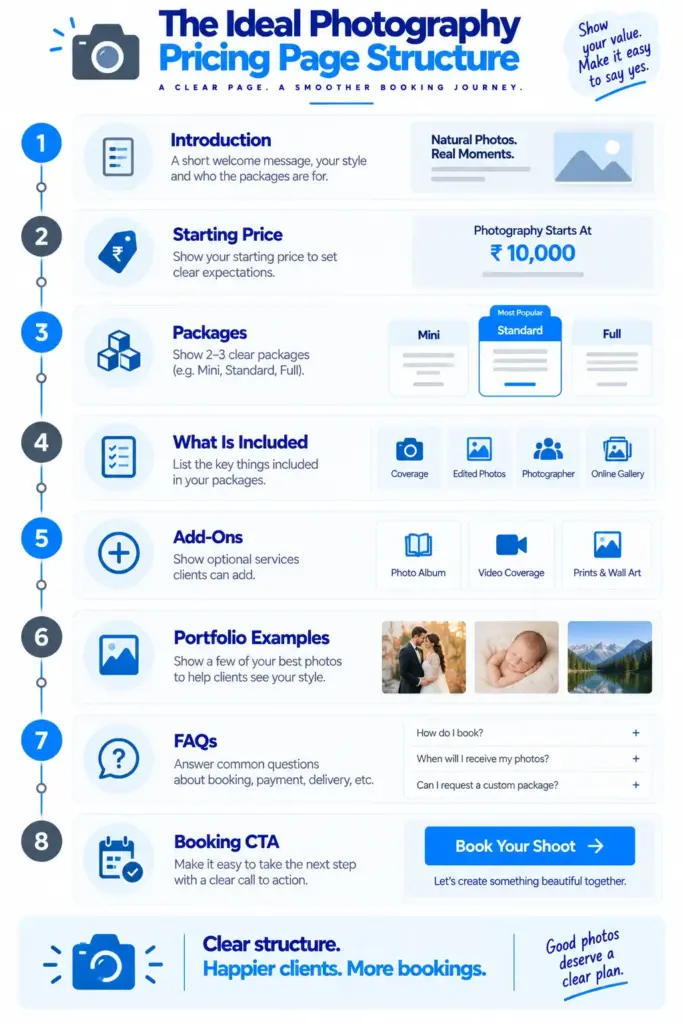
A Simple Structure For A Photography Pricing Page
A useful Photography Pricing Page Copy structure can look like this:
1. Short Introduction
Explain what type of photography the page covers and who it is for.
2. Starting Price
Give a starting price or explain that packages are customised if appropriate.
3. Main Packages
Show two or three clear packages with price, best-for description and key deliverables.
4. What Is Included
Explain the important details such as coverage, edited images, delivery and gallery.
5. Optional Extras
List genuine add-ons separately.
6. Portfolio Examples
Show photographs that represent the service and style.
7. Common Questions
Answer practical questions about delivery, booking, editing, travel and other relevant details.
8. Booking Step
Give one clear next action.
This structure is supported by current photography pricing-page examples, which commonly put the offer, packages, deliverables, proof and booking step together rather than making the customer search across different pages.
A Final Photography Package Copy Checklist
Before publishing a package page, read every package from the point of view of someone who has never worked with the studio before. The visitor should not need specialist photography knowledge to understand the basic offer.
Check whether:
- The package has a clear name.
- The package says who it is suitable for.
- The photography time is clear.
- The number of photographers is clear where relevant.
- The number of edited images is clear.
- “Edited”, “retouched” and similar terms are explained where necessary.
- Delivery method is explained.
- Delivery timing is stated.
- Albums, prints or other physical products are described clearly.
- Add-ons are separated from the main package.
- Starting prices or fixed prices are accurate.
- Custom pricing is explained where necessary.
- Important terms are easy to find.
- The package differences are obvious.
- The next booking step is clear.
If several packages still look almost identical after this review, the problem may not be the design. The packages themselves may need to be simplified.
The Main Lesson For Photography Studio Website Copywriting
The purpose of a photography package page is not to show how many features the studio can offer. It is to help a potential client understand what they are buying and decide what type of service fits their needs.
Good Photography Studio Website Copywriting makes this process easier by using simple package names, clear descriptions, useful “best for” lines, specific deliverables and honest information about pricing and delivery. Instead of forcing visitors to compare long lists of technical terms, the website should explain the important differences in normal language.
A strong package does not need to promise everything. In fact, a package is often easier to understand when its boundaries are clear. If the standard package includes two hours, 40 edited images and an online gallery, say that clearly. If the customer needs more time, more images, an album or another photographer, show those options separately rather than putting every possible service into one confusing package.
The final goal of Photography Studio Website Copywriting is therefore quite simple: make it easy for the visitor to understand the photography service before they contact the studio. When the customer already knows what the package includes, what it costs or starts from, what they will receive and what happens next, the enquiry can focus on their actual photography needs instead of basic questions that the website should have answered.