
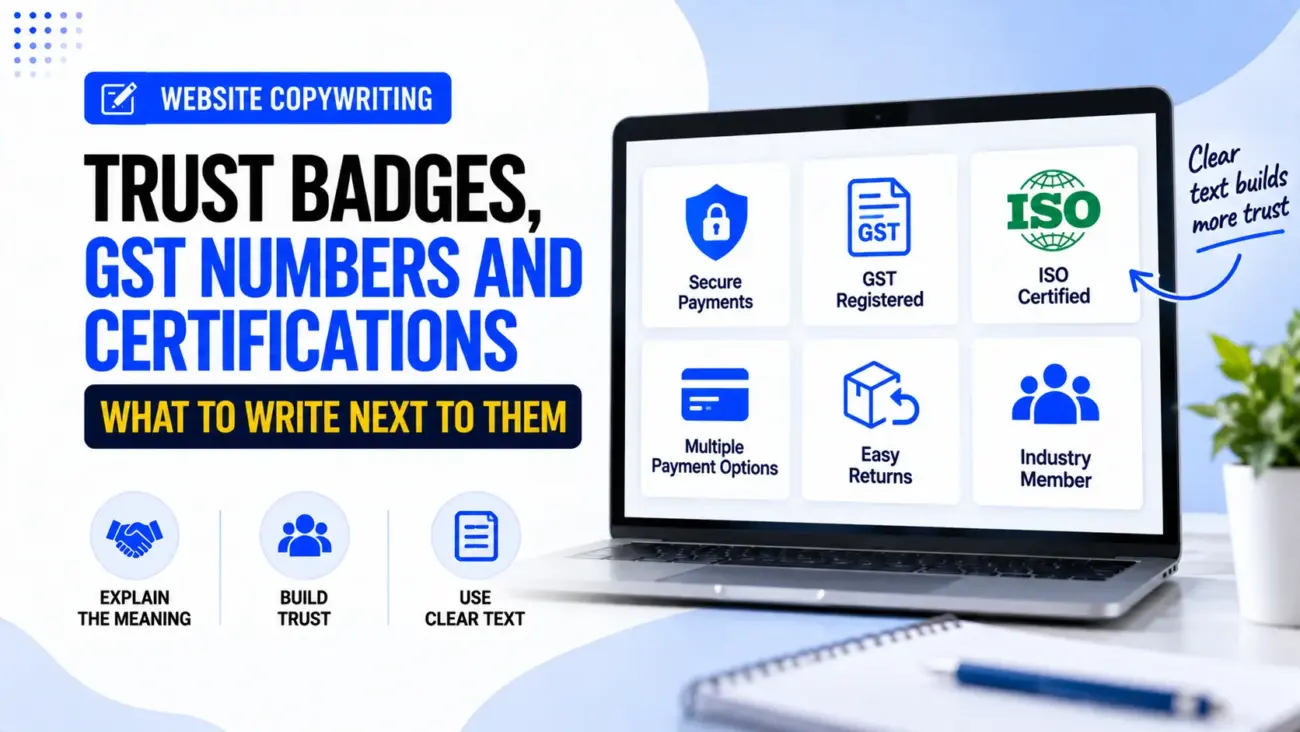
A trust badge can look very simple on a website. There may be a small security icon, a GST number, a certification logo, a payment logo or a professional membership badge sitting near the button or at the bottom of the page. The problem is that the image itself does not always tell the visitor what it means. If someone sees a certification logo without any explanation, they may recognise it, ignore it, or wonder whether it has anything to do with the product or business.
This is where Trust Badge Copywriting becomes useful. The small line of text next to a badge should explain the reason it is there in simple language, without making a bigger claim than the badge actually supports. A GST number can be introduced as a business registration detail, a security badge can explain the payment or security process, and a certification can explain what has actually been certified. The aim is not to make the website look more trustworthy by adding more logos, but to help visitors understand the evidence already being shown.
Why The Text Next To A Badge Matters
A badge is a visual shortcut, but visual shortcuts can be unclear when the visitor does not know what the symbol represents. Shopify describes trust badges as small icons that can communicate things such as payment methods, business policies, product-related certifications and third-party accreditation. Their usefulness depends partly on whether customers understand what the badge means.
This is why Trust Badge Copywriting should answer a small but important question: “What does this badge mean for me?” A customer does not necessarily need a long explanation, but they should not have to guess whether a logo represents security, registration, certification, membership, payment acceptance or a company policy.
For example, compare these two versions:
Weak:
✓ Certified
✓ Secure
✓ Trusted Business
Clearer:
GST Registered Business
GSTIN: XXAAAAA0000X1ZX
Or:
Secure payments
Payments are processed through our secure payment provider.
Or:
ISO 9001 Certified
Our quality management system is certified to ISO 9001.
The second examples give the visitor something they can actually understand.
Trust Badges Are Not All The Same
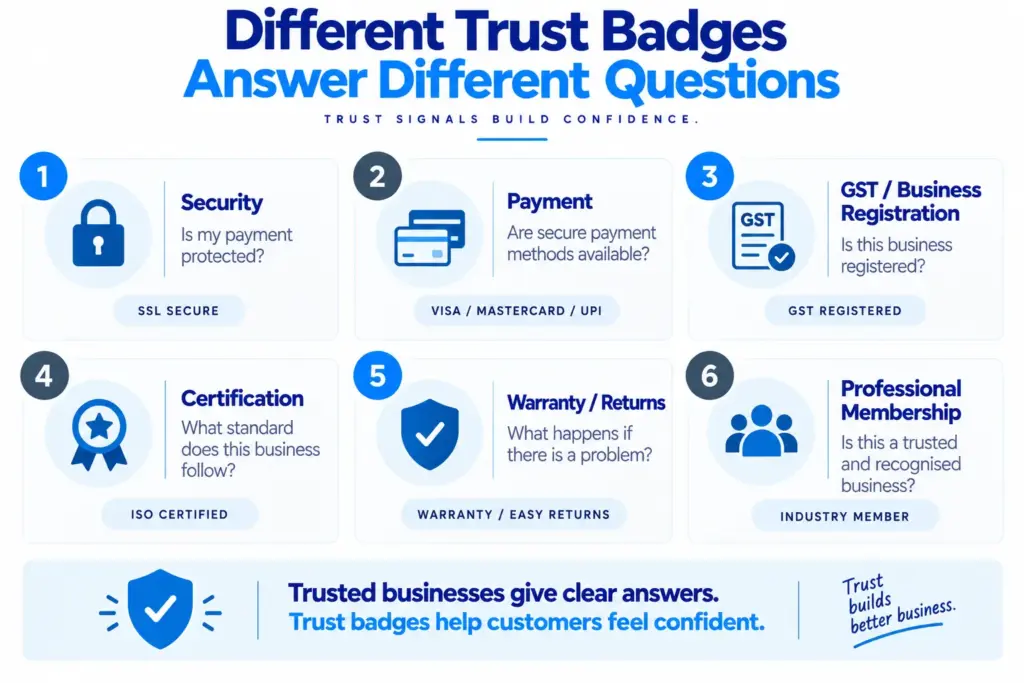
Before writing the small copy, we need to identify what type of trust signal we are displaying. Treating every badge in exactly the same way can lead to vague wording such as “Trusted and Secure”, even when the badge has nothing to do with website security.
A website may have several different types of trust signals:
- Payment and security badges
- Business registration details
- GSTIN
- Professional certifications
- Industry memberships
- Product certifications
- Delivery or returns policies
- Warranty or guarantee badges
- Payment method logos
- Genuine awards or media mentions
Each one answers a different customer concern. A payment badge may reduce uncertainty around how a customer can pay, while a certification may provide information about a process, product or professional standard. A GSTIN is a business tax-registration detail, not a general security seal.
This distinction is one of the most important parts of Trust Badge Copywriting, because the wording should describe the actual evidence rather than turning every logo into a broad trust claim.
What To Write Next To A GST Number
A GST number can be useful because it provides a formal business registration detail, but the copy beside it should remain factual. The Goods and Services Tax system assigns a GSTIN to registered taxpayers, and official GST material describes the GSTIN as the identification number assigned through registration.
That does not mean a website should write:
100% Government Approved Company
simply because a GSTIN is displayed. GST registration and a general government endorsement are not the same thing.
A clearer presentation is:
GST Registered Business
GSTIN: XXAAAAA0000X1ZX
Or, where appropriate:
GSTIN
XXAAAAA0000X1ZX
If there is a reason to make the information more useful, the website can link the number or business information to an appropriate official verification or registration resource, provided the link and verification process are accurate and current.
The important point for Business Registration Number Website Display UX is that the number should not be presented as meaningless technical information. Give it a simple label so visitors understand what they are looking at.
Do Not Turn A GSTIN Into A Trust Claim
A common mistake is to write something like:
Government Verified & 100% Trusted
GSTIN: XXAAAAA0000X1ZX
This wording creates a much bigger impression than the number itself supports. A GSTIN identifies a registered taxpayer; it does not automatically prove product quality, customer service, financial strength, reliability or every other claim a business might want to make.
The better approach is to let the registration detail remain what it is.
GST Registered
GSTIN: XXAAAAA0000X1ZX
Then use separate evidence for separate claims. Customer reviews can provide customer experience evidence, certifications can support relevant standards, and clear policies can explain what happens after purchase.
This makes Website Trust Signals Copywriting more believable because each signal has a specific job instead of every badge being used to say “trust us”.
What To Write Next To A Certification
Certifications need slightly more explanation because many visitors may not know exactly what a certification covers. A logo by itself may be familiar to some people but meaningless to others.
Instead of:
Certified
write:
ISO 9001 Certified
Our quality management system is certified to ISO 9001.
Or, if the certification relates to a product:
Certified to [standard name]
This product has been certified against [relevant standard].
The exact wording should always match the actual certificate and its scope. If the certification applies only to one factory, product, process or management system, do not make it sound as though the entire company or every product is certified.
This is an important part of How To Display Certifications On Website Copy because the copy should make the scope easier to understand rather than making the badge sound larger than it really is.
If a certification has an expiry date, certificate number or verification page that customers may reasonably want to check, the website can provide that information where appropriate. This can be especially useful for professional or technical businesses where certification is directly connected to the service being purchased.
The Difference Between “Certified” And “What Is Certified?”
The word “certified” on its own is often too vague. A visitor may ask, “Certified for what?”
This is why a useful certification block can have three small parts:
Certification name: What is the certification called?
Scope: What does it actually cover?
Verification: Can the certificate or accreditation be checked?
For example:
ISO 9001 Certified
Quality management system certified to ISO 9001.
Certificate No. XXXXX | Verify certification
This is much more informative than putting a large certification logo next to the words “Quality Guaranteed”.
The latter is a different claim and may not be supported by the certification itself.
What To Write Next To A Security Badge
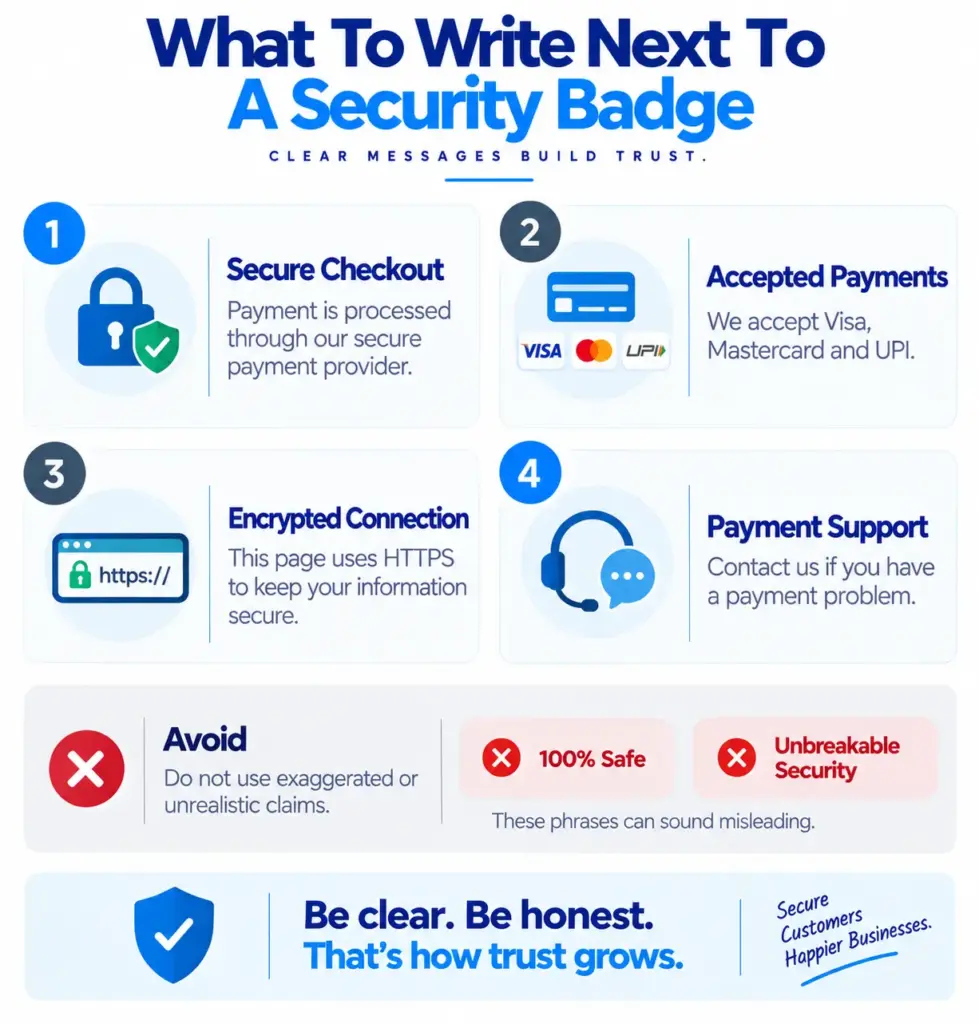
Security copy needs particular care because the words “secure”, “protected” and “safe” can mean different things. A website should not claim that every part of a transaction is protected by a particular technology unless that is actually true.
If the website uses HTTPS and a recognised payment provider, a simple checkout message might be:
Secure checkout
Payment details are handled through our secure payment provider.
Or:
Secure payment
Your payment is processed through [payment provider].
The exact statement should match the actual setup. Do not write “Your data is 100% safe” or “Bank-level security guaranteed” simply because a generic security badge is available.
Baymard’s current checkout guidance recommends making security indicators such as SSL badges and payment logos visible near the payment form, while also stressing that clear next steps, no surprise costs and transparent information are important trust builders.
This means Secure Checkout Microcopy should not try to do all the work by itself. The checkout also needs to look consistent, explain what happens next and avoid surprising the customer with unexplained charges or redirects.
Payment Logos Need A Small Explanation Too
Visa, Mastercard, UPI, PayPal and other payment logos are often displayed together near a checkout button. These logos are useful because they show which payment methods are accepted, but they do not necessarily need a large trust message beside them.
A simple line is often enough:
Payment methods we accept
followed by the relevant payment logos.
If there is a reason to provide more reassurance:
Secure payment options
Choose from the payment methods available at checkout.
The copy should not imply that displaying a payment logo itself makes the website secure. A payment logo tells the customer that the payment method is accepted; the security of the payment process should be described separately and accurately.
This distinction is another useful principle for Ecommerce Conversion Copywriting Tips: do not make one visual element responsible for a claim it was never designed to communicate.
What To Write Next To Awards And Membership Logos
Awards and professional memberships can also work as trust signals, but they should be explained in a factual way. If a company has genuinely won an award, say what the award was and when it was received if that information is useful.
For example:
Winner — ABC Design Awards 2026
Recognised for our residential interior design project.
For a professional membership:
Member of [Organisation Name]
We are members of [Organisation Name].
This is better than:
Award-winning experts
because the second statement is broad and gives the visitor no information about what the award was or who gave it.
The same rule applies to “featured in” logos. If a publication actually featured the business, explain it simply and, where appropriate, link to the article. Do not display a publication logo merely to create the impression that the publication endorsed the business.
Put The Explanation Close To The Badge
The location of the copy matters almost as much as the words themselves. If a badge appears in the footer and its explanation is hidden three pages away, the visitor may never connect the two.
Trust signals should normally be placed close to the point where the relevant concern occurs. Shopify’s current guidance, for example, notes that business-level certifications can appear on high-traffic pages, product certifications can be useful on product pages, payment badges often belong around checkout, and policy badges can sit near the purchase action.
For example:
Product page
Certified Product
Certified to [standard] for [specific purpose].
Checkout
Secure payment
Payment is processed through our secure payment provider.
Footer
GST Registered Business
GSTIN: XXAAAAA0000X1ZX
About page
Professional Membership
Member of [organisation name] since [year], if accurate.
The visitor should not have to work out which badge relates to which claim.
Keep Trust Microcopy Short
Trust copy is usually small because it sits beside an icon, button or form. That does not mean it should be vague, but it does mean we should remove unnecessary words.
Instead of:
We are extremely proud to inform all our valued customers that we have successfully completed the required certification process and are now fully certified according to the recognised international standard.
write:
ISO 9001 Certified
Our quality management system is certified to ISO 9001.
The second version is easier to read and gives the important information immediately.
Good Trust Badge Copywriting is therefore often about removing words rather than adding them. The visitor should be able to understand the meaning in a few seconds.
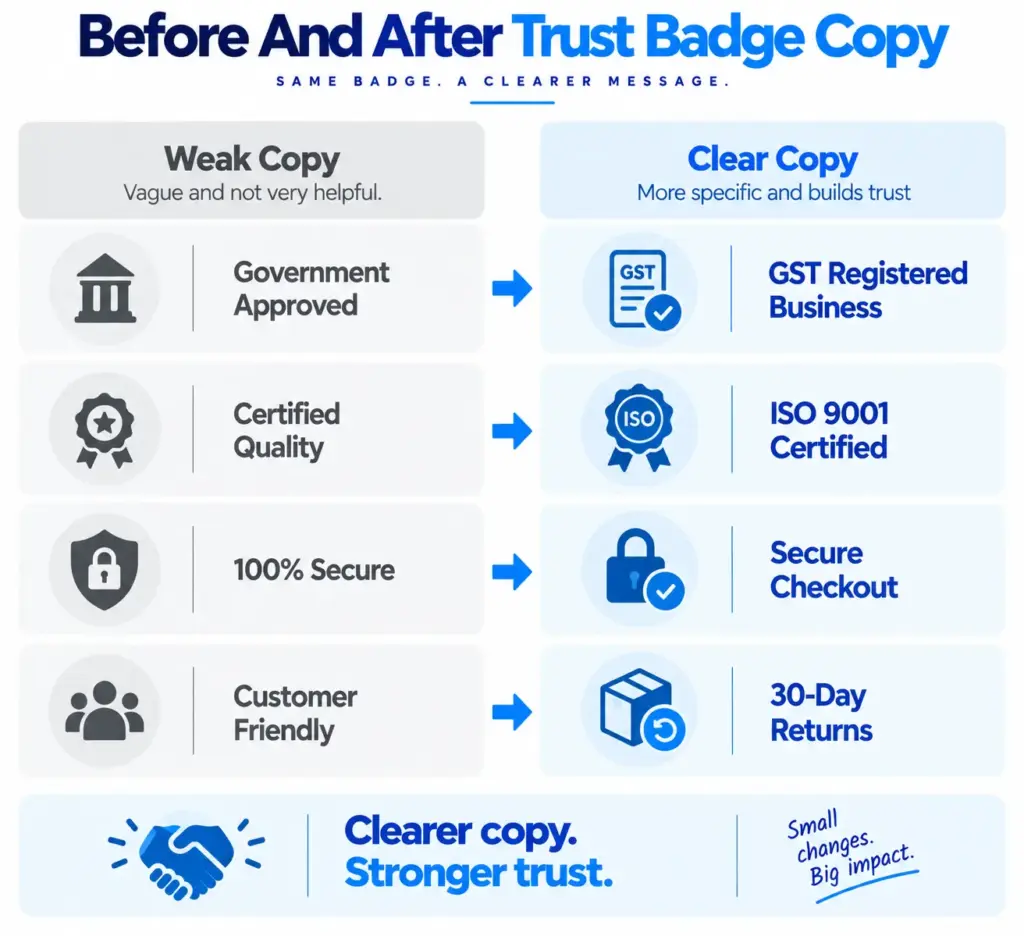
Before And After: Trust Badge Copywriting Examples
Here are some simple examples of how small changes can make trust signals clearer.
Example 1: GST
Before:
✓ Government Approved
GST No. 09AAAAA0000A1Z5
After:
GST Registered Business
GSTIN: 09AAAAA0000A1Z5
The second version describes the information instead of making a broader claim.
Example 2: Certification
Before:
✓ Certified Quality
After:
ISO 9001 Certified
Quality management system certified to ISO 9001.
The visitor now knows which certification is being discussed and what it relates to.
Example 3: Security
Before:
✓ 100% Secure Website
After:
Secure checkout
Payment is processed through our secure payment provider.
The second version is more specific and avoids an absolute claim that may be difficult to support.
Example 4: Returns
Before:
✓ Customer Friendly
After:
30-Day Returns
Eligible products can be returned within 30 days under our return policy.
Now the badge communicates an actual policy rather than a general marketing statement.
Do Not Use Trust Badges Just To Fill Empty Space
A website can easily become overloaded with badges. There may be a row of ten logos under the hero section, another row beside the product price, several payment icons in the footer and another set near the checkout button.
More badges do not automatically mean more trust.
Nielsen Norman Group’s research on ecommerce trust and credibility covers a much wider set of factors than badges alone, including company information, product information, pricing, customer support, policies, security and professional presentation. This is important because trust is built by the whole website experience, not one strip of logos.
Before adding a badge, ask:
- Is this genuine?
- Is it still current?
- Does it relate to this business, product or process?
- Will the visitor understand what it means?
- Does it answer a real customer concern?
- Can the claim be explained or verified?
If the answer is no, the badge may not belong on the page.
Make Verification Easy When It Matters
Some trust signals are more useful when customers can check them. This is particularly relevant for certifications, professional memberships and other third-party claims.
If there is an official verification page, certificate record or relevant organisation page, a small link can be added:
ISO 9001 Certified
Certified to ISO 9001. Verify certificate
Or:
Member of [Organisation]
View membership
The link should lead to a genuine source and the claim should match the information shown there. Do not create a fake verification page on the business website and present it as independent proof.
For GST information, the business should also make sure that the GSTIN displayed on the website matches its official registration and other business documents. CBIC guidance confirms that GSTIN is part of the registration and required invoice information for registered suppliers.
Trust Copy Should Match The Customer’s Concern
A useful way to write these small messages is to start with the concern rather than the badge.
- If the customer is worried about payment security, write about payment security.
- If the customer wants to know whether the business is registered, show the relevant registration detail.
- If the customer wants to know whether a product meets a particular standard, explain the certification.
- If the customer is worried about returns, explain the return policy.
- If the customer wants to know whether a professional has recognised qualifications, show the relevant qualification or membership.
This simple approach makes Website Trust Signals Copywriting much easier because we are no longer asking, “What impressive thing can we write beside this logo?” Instead, we are asking, “What question does this evidence answer?”
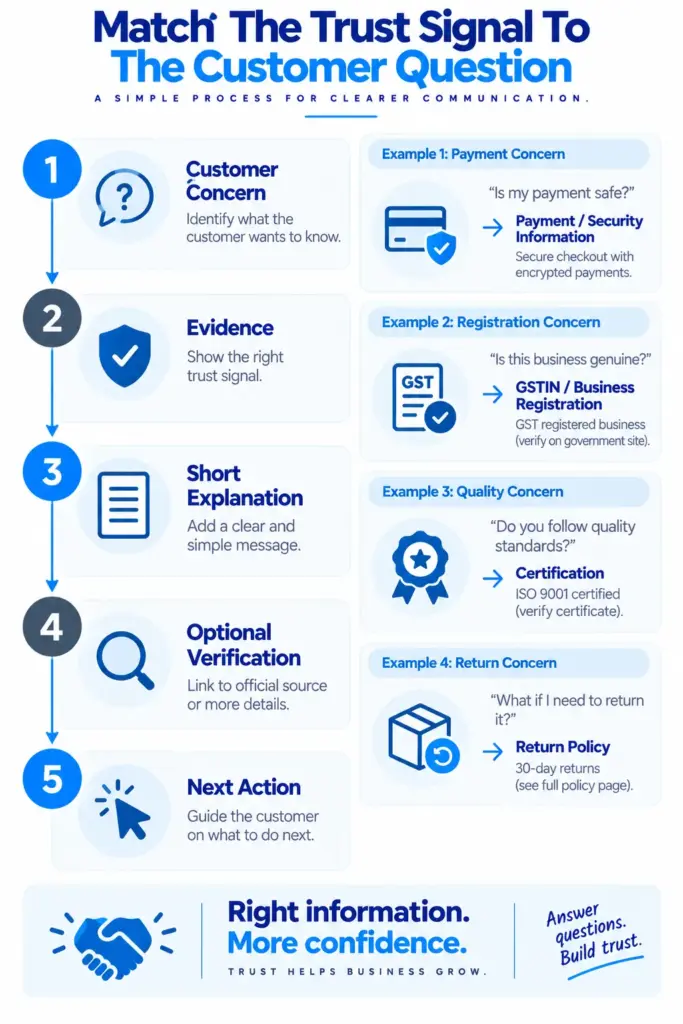
A Simple Trust Badge Copy Formula
A useful formula for writing these small pieces of copy is:
[What it is] + [What it means] + [Optional verification]
For example:
GST Registered Business
GSTIN: XXAAAAA0000X1ZX
Or:
ISO 9001 Certified
Quality management system certified to ISO 9001.
Verify certificate
Or:
Secure Checkout
Payments are processed through our secure payment provider.
Or:
30-Day Returns
Eligible products can be returned within 30 days.
Read our return policy
The formula is simple enough to use across product pages, service pages, checkout pages and footers, while still leaving room for the wording to match the actual business.
Our earlier article, “The 30-Point Website Copy Checklist” explains how to review trust claims, proof, policies and contact information before publishing.
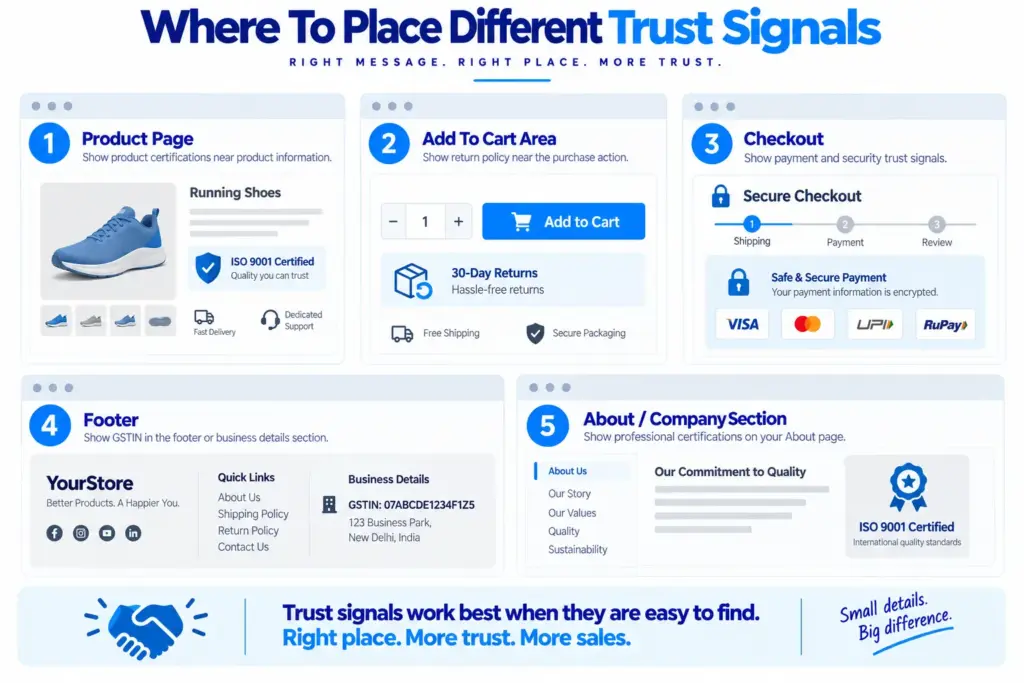
A Practical Trust Signal Layout
For an ecommerce website, a simple layout might look like this:
Near The Product Information
Secure payment options
Visa · Mastercard · UPI · [Other genuine methods]
Near The Add To Cart Button
30-Day Returns
Eligible products can be returned under our return policy.
Near Checkout
Secure Checkout
Payment is processed through our secure payment provider.
Footer
GST Registered Business
GSTIN: XXAAAAA0000X1ZX
About Or Quality Section
ISO 9001 Certified
Quality management system certified to ISO 9001.
This creates a clear information system where each trust signal appears near the question it helps answer.
Baymard’s checkout research specifically recommends making relevant security indicators and payment logos visible around the payment form, while also emphasising clear information and predictable checkout behaviour.
A Final Trust Copy Checklist
Before publishing any badge, certification or registration detail, review the surrounding copy rather than checking only whether the logo looks good. The purpose of the section is to help the visitor understand something important, so the words need to be as accurate as the graphic.
Check the following:
- Is the badge genuine and current?
- Does the wording describe what it actually represents?
- Is the certification scope clear?
- Is the GSTIN correct?
- Are security claims supported by the actual payment setup?
- Are payment logos limited to methods the business really accepts?
- Are return or warranty claims consistent with the real policy?
- Can an important third-party claim be verified?
- Is the copy short enough to scan?
- Is the trust signal placed close to the relevant customer concern?
- Have broad claims such as “100% secure” or “government approved” been avoided unless they can genuinely be supported?
The final check is especially important because Trust Badge Copywriting should make evidence clearer, not make the business sound bigger than it is.
Conclusion
A trust badge does not need a large paragraph beside it. In most cases, the best supporting copy is a short, clear explanation that tells the visitor what the badge means and why it is relevant.
A GSTIN should be labelled as a GST registration detail. A certification should explain what has been certified. A security badge should describe the actual security or payment process. A return badge should state the real return policy. A professional membership should identify the organisation. When the wording stays close to the evidence, the website feels clearer and more honest.
The strongest Trust Badge Copywriting therefore does not try to make every badge sound impressive. It helps customers understand the information already available to them. This is especially useful on ecommerce pages and checkout screens, where people may be deciding whether to share payment details or complete a purchase. Clear microcopy, visible policies, accurate business information and a consistent website experience all work together to reduce uncertainty.
The next time we add a certification logo, GST number, payment badge or security icon to our website, the question should not simply be, “Where should we put the badge?” The better question is, “What does the visitor need to understand when they see it?” Once that question is answered, the small line of copy becomes much easier to write.